NoxPlayer is a popular tool that lets you play Android games on your computer. It’s been downloaded over 150 million times, which shows how many people are interested in it. But with popularity comes questions about safety, and that’s likely why you’re here.
Maybe you’re excited about playing your favorite mobile games on a bigger screen, or you’re looking for a way to use Android apps on your PC. Whatever your reason, you want to make sure you’re not putting your device at risk. That’s smart thinking.
Some users have raised concerns about NoxPlayer’s safety, mentioning potential malware issues. It’s natural to be cautious, especially when it comes to software that interacts with your personal devices.
In this article, we’ll break down how NoxPlayer works, why people like it, and most importantly, what you need to know about its safety. We’ll look at the facts and address the concerns so you can decide if NoxPlayer is right for you.
Whether you’re a gamer, an app enthusiast, or just curious, stick around. We’re going to explore everything you need to know about NoxPlayer’s safety and functionality right here, right now.
What is NoxPlayer?
NoxPlayer is a tool that lets you use Android apps and games on your computer. Think of it as a virtual Android device that lives right on your PC or Mac screen. It’s called an Android emulator, which is just a fancy way of saying it mimics an Android device on your computer.
You might be wondering why you’d want this. Well, maybe you’ve got a favorite mobile game you’d love to play on a bigger screen. Or perhaps there’s an Android app you need for work, but you prefer using your computer. That’s where NoxPlayer comes in handy.
With over 150 million downloads worldwide, NoxPlayer has clearly caught a lot of people’s attention. It’s not hard to see why – the idea of accessing all those Android apps and games on your computer is pretty appealing, isn’t it?
Is NoxPlayer safe for your computer?
Let’s talk about the big question on your mind – is NoxPlayer safe for your PC or Mac? It’s a valid concern, and you’re right to ask. Here’s what you need to know:
The good news is that NoxPlayer has several safety measures in place. When you download it from the official website, you’re getting the safest version possible. They’ve even added a feature that checks if all the files are secure when you update.
NoxPlayer has passed many antivirus tests, which is reassuring. Plus, it’s backed by Sea Limited, a well-known company. This suggests it’s gone through some serious checks.
But here’s the thing – no software is 100% safe. There have been some issues in the past. In 2024, researchers found that NoxPlayer’s server was hacked, affecting some users in specific countries. Some people have also said their computers slowed down after installing it.
So, what does this mean for you? While NoxPlayer is generally safe, you should still be cautious. Make sure you only download it from the official site. Keep your antivirus software up to date. And if you notice any unusual behavior on your computer after installing NoxPlayer, it might be worth investigating.
Remember, your computer’s safety is in your hands. Stay informed and be cautious, and you’ll be in a good position to enjoy NoxPlayer safely if you choose to use it.
Is NoxPlayer safe for Android devices?
Here’s something you might find interesting – NoxPlayer isn’t actually something you install on your Android phone or tablet. It’s a tool that runs on your computer, creating a virtual Android environment. But it does have some connections to your Android world. Let’s break it down:
First, let’s talk about data security. When you use NoxPlayer, you’re using a virtual Android system on your computer. If you log into your Google account or use apps within NoxPlayer, that information is living in this virtual space. So, the safety of that data depends on how secure NoxPlayer itself is.
NoxPlayer uses a version of the Google Play Store. This means if you decide to log into your Google account on NoxPlayer, you’re trusting it with your Android account information. It’s like giving NoxPlayer the keys to your Android kingdom, so to speak.
Also, remember that apps in NoxPlayer might ask for permissions, just like they do on your phone. You’ll want to be careful about what permissions you give, especially since this is happening in a virtual environment on your computer.
So, while NoxPlayer doesn’t directly affect the safety of your physical Android device, it can impact your Android data and account security. If you choose to use NoxPlayer, be mindful of what information you’re sharing within it.
Treat it with the same caution you’d use when installing a new app on your phone. Your data is valuable, so it’s always good to be careful with it, no matter where you’re using it.
How to use NoxPlayer safely
If you’ve decided to give NoxPlayer a try, let’s talk about how to use it safely. Here are some tips to help protect your computer and your data:
1. First things first, always download NoxPlayer from the official website. This is your best bet for getting a safe, untampered version.
2. Keep NoxPlayer up to date. Just like your phone, updates often include important security fixes.
3. Run regular antivirus scans on your computer. This helps catch any potential issues early.
4. Pay attention to how your computer performs after installing NoxPlayer. If you notice it slowing down or acting strangely, that’s a red flag.
5. If something seems off, don’t hesitate to uninstall NoxPlayer and start fresh with a new download.
6. Here’s a smart move: use a separate Google account for NoxPlayer, not your main one. This adds an extra layer of protection for your primary account.
7. Be picky about which apps you install within NoxPlayer. Treat it like you would your actual phone – only download apps you trust.
8. Lastly, avoid storing sensitive information in NoxPlayer. Remember, it’s a virtual environment, so it’s best to keep your private data elsewhere.
Is NoxPlayer a good Android emulator?
Many users find NoxPlayer to be an excellent Android emulator. Here’s why:
- Lightweight: It only needs 1.5 GB of RAM and 3 GB of storage.
- Feature-rich: It supports most smartphones and tablets, allows keyboard and game controller mapping, and lets you play multiple games at once.
- Customizable: You can adjust screen resolutions, performance settings, and keyboard shortcuts.
- Macro recording: NoxPlayer can remember and repeat your actions in a game, which can be very handy.
- Compatibility: It works on both Windows and Mac (OS X 10.9 or newer).
NoxPlayer vs. other emulators
When compared to other emulators like BlueStacks, NoxPlayer holds its own:
- It’s slightly smaller in size.
- It allows multiple instances, which BlueStacks doesn’t.
- It offers more customization options.
However, BlueStacks is considered by many to be a safer option, especially given NoxPlayer’s past security issues.
How NoxPlayer works
NoxPlayer creates a virtual Android device on your computer. It’s built on Android 4.4.2 KitKat, which allows it to run a wide range of Android apps and games. It uses the Chromium browser to help you search and play games, providing a smooth experience as if you were using a real Android device.
Why people like NoxPlayer
- Cross-platform compatibility: Works on both Windows and Mac.
- Controller support: Allows the use of game controllers, keyboards, and even screen recording.
- Wide app compatibility: This lets you play almost any Android game or app, regardless of your device.
- Multiple instances: You can run more than one Android app or game simultaneously.
How to remove NoxPlayer from your PC
If you decide you no longer want NoxPlayer, here’s how to remove it:
- Run a security check with an anti-malware program first.
- Update Windows Defender for an extra layer of protection.
- Go to the Control Panel
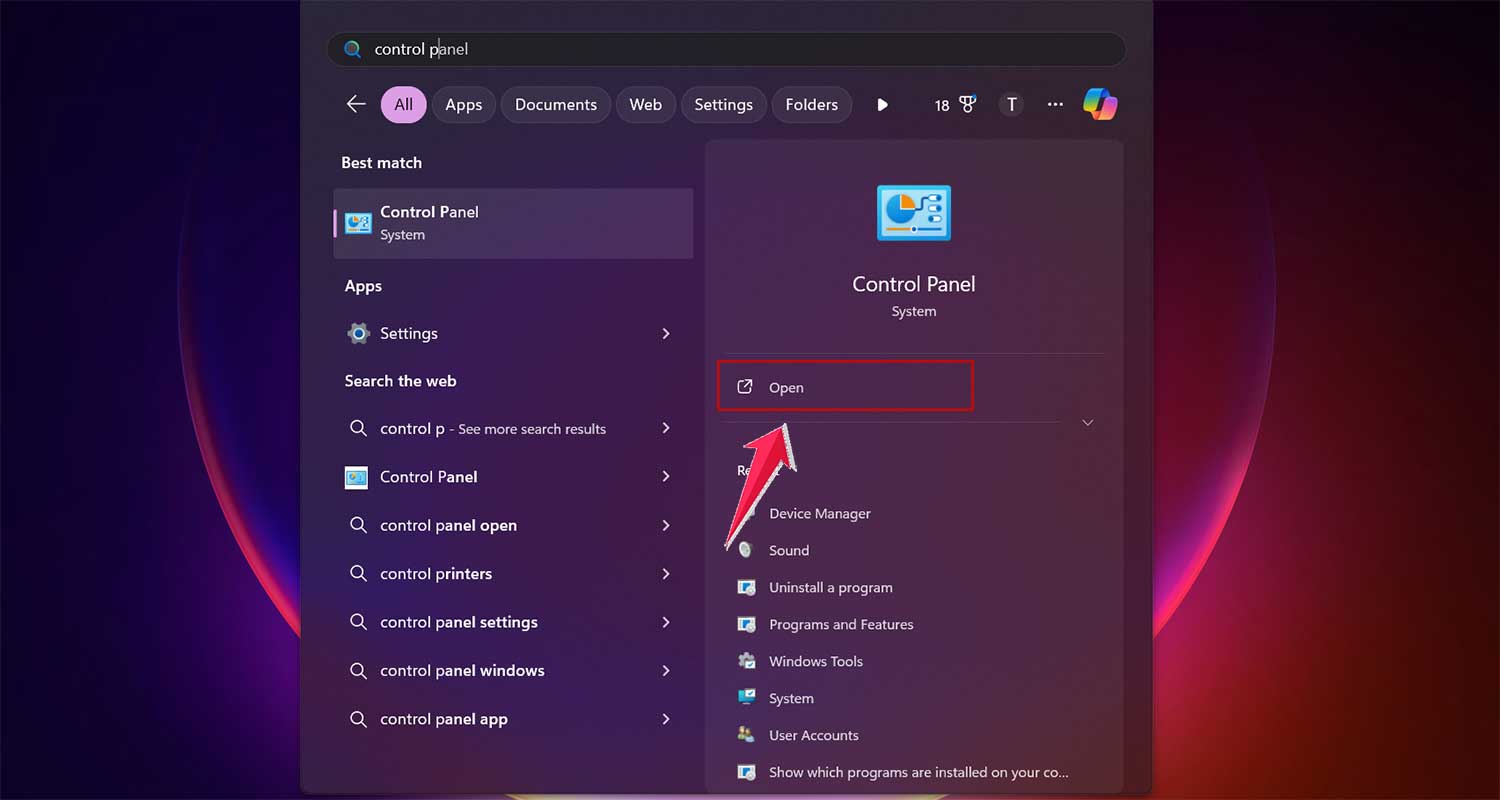
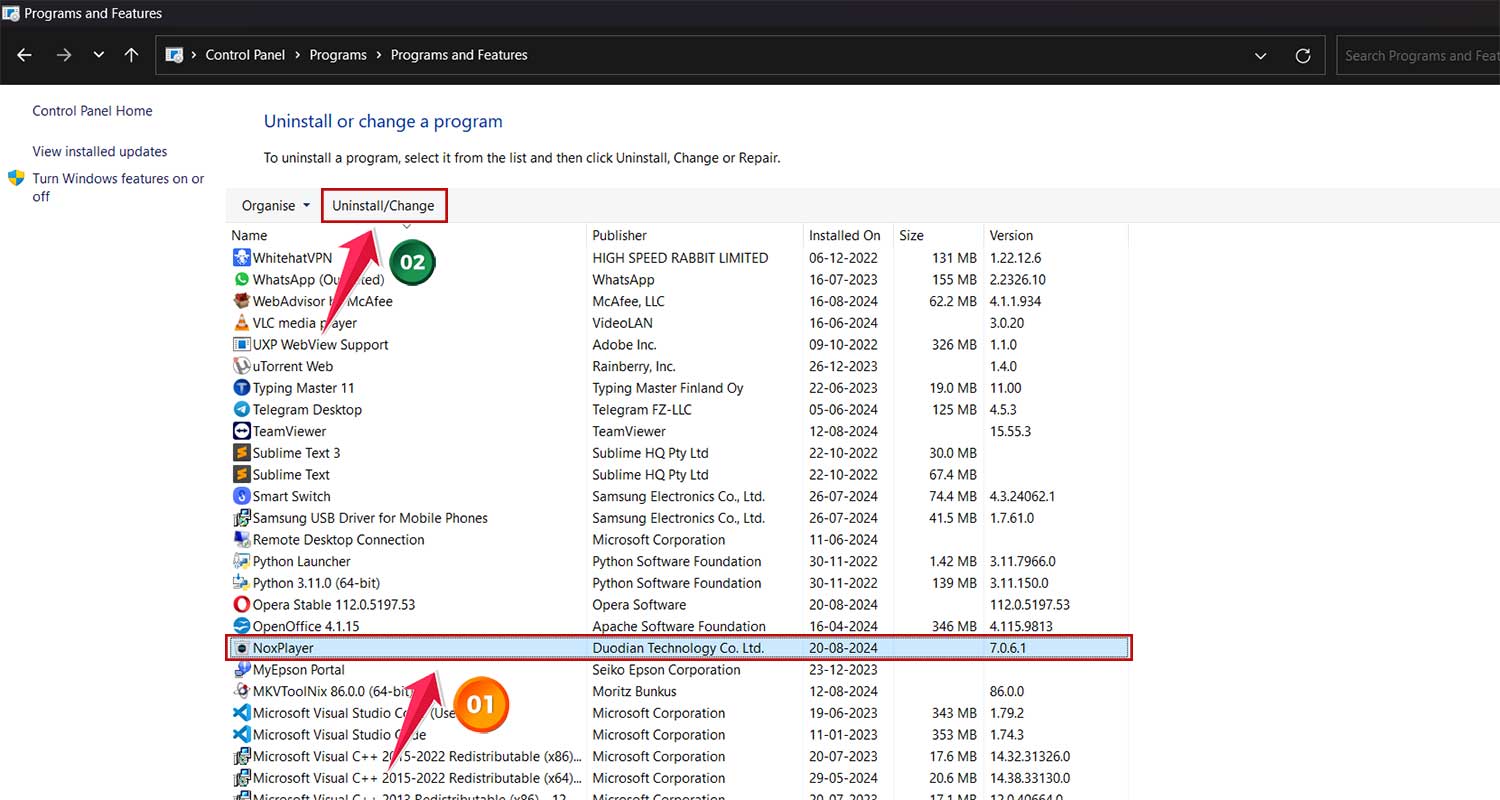
- Then, Programs > Uninstall a program.

- Find NoxPlayer in the list and click Uninstall.
- After uninstalling, run another security scan to ensure everything is clean.
Alternatives to NoxPlayer
If you’re not comfortable with the potential risks associated with NoxPlayer, there are alternatives:
- BlueStacks: Another popular Android emulator, often considered safer than NoxPlayer.
- Official Android Studio: Google’s official development environment, which includes an Android emulator.
- Genymotion: A more developer-focused Android emulator with a good reputation for security.
The takeaway
Let’s wrap this up, shall we? You came here wondering about NoxPlayer, and now you’ve got the full picture. Here’s what you need to remember:
NoxPlayer can be a great tool for enjoying Android apps and games on your computer. It’s popular for a reason – lots of people find it useful. But like any software, it’s not without its risks. You’re smart to be cautious.
To stay safe, always download from the official website and keep NoxPlayer updated. Keep an eye on how your computer’s running after you install it. And treat that virtual Android environment just like your real phone – be careful what you download and what information you share.
Here’s the thing about technology – it’s always changing. What’s safe today might not be tomorrow. So stay informed and always put your device’s security first. If you’re not comfortable with NoxPlayer, don’t worry – there are other options out there.
In the end, it’s your call whether to use NoxPlayer or not. If you do, just follow those safety tips we talked about. And remember, no matter what software you’re using, always stay alert and keep your security up to date. Your digital safety is in your hands, and I know you’ve got this!