You might think Apple’s services are off-limits if you’re an Android user. Well, here’s some good news – you can actually access several iCloud services right from your Android device!
While Apple doesn’t offer many apps for Android, there’s a simple way to use some iCloud features using just your mobile browser. It’s almost as easy as adding a website to your Android home screen.
This guide will show you how to tap into iCloud on your Android smartphone. It’s not a complete solution, but it’ll give you access to some handy Apple services.
Let’s dive in and see how you can bridge the gap between Apple and Android.
How to use iCloud for Android
Accessing iCloud on your Android is a breeze! Just follow these simple steps:
- Start by launching the Chrome browser on your Android device.
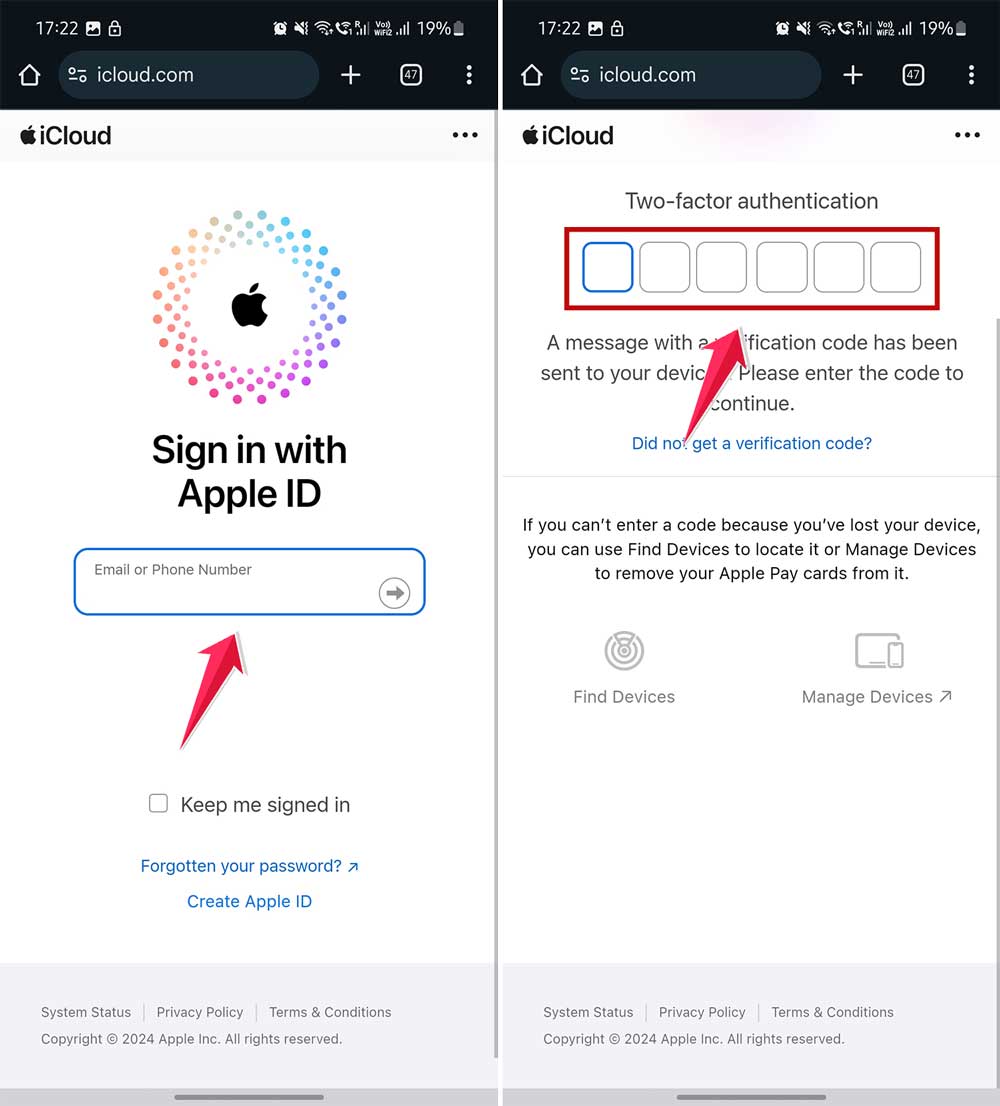
- Go to iCloud.com.

- Enter your Apple ID credentials, or create a new account if you already have them.
- Verify Your Identity: Apple takes security seriously! You’ll likely need to verify your identity. If you’re logging in from a new device, Apple will notify your other devices. Tap Trust on any of them, and you’ll receive a six-digit code. Enter this code on your Android to gain access.
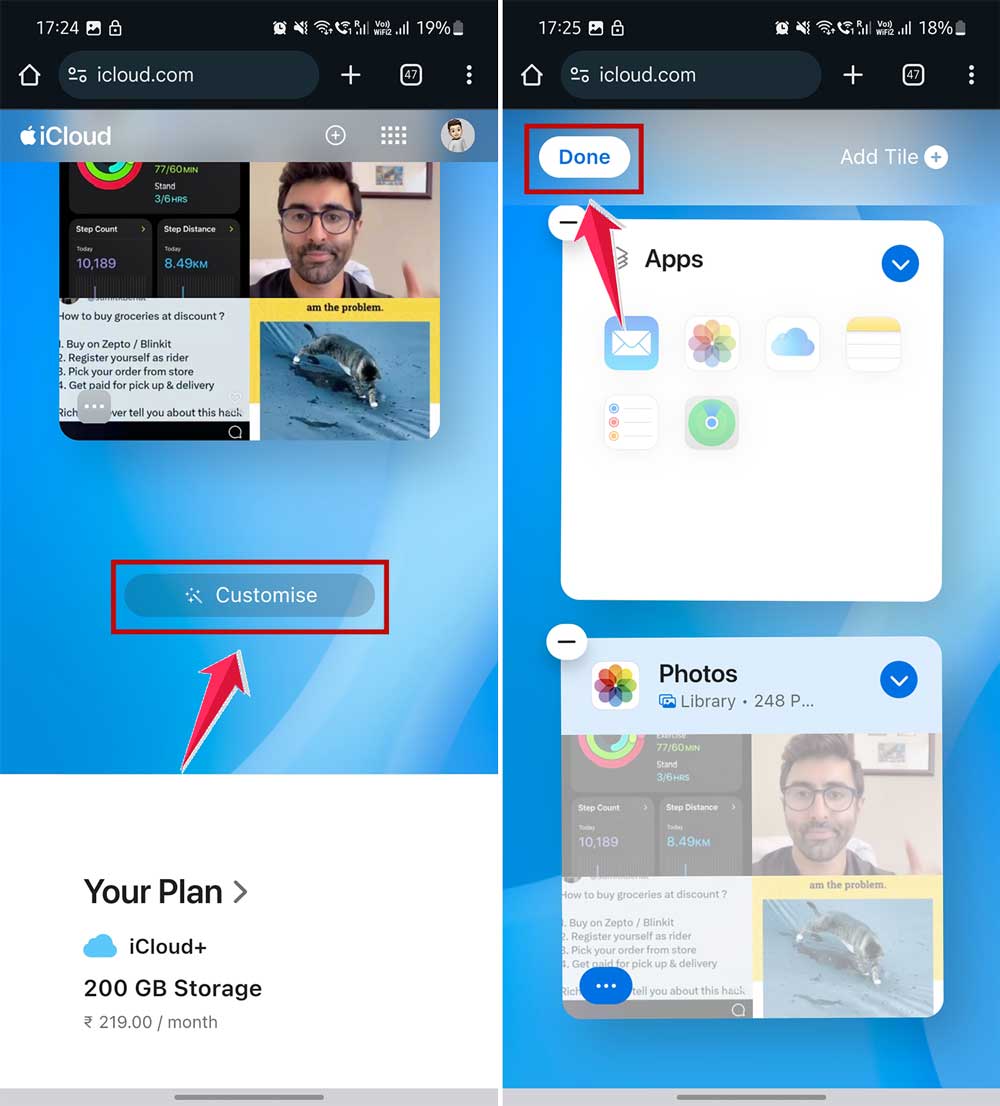
Once you’re in, you’ll see shortcuts to all the available iCloud web apps like Mail, Photos, Drive, Notes, and Find My.
If you have all your apps listed here, that would be good. Otherwise, you can add more apps by tapping on the Customize button at the bottom of the page to add tiles for Calendar, Numbers, Pages, and Keynote.
Now, if you want to check your storage settings. Tap on your profile icon to access iCloud Settings. Here, you can check your storage and manage other account settings in one handy place.
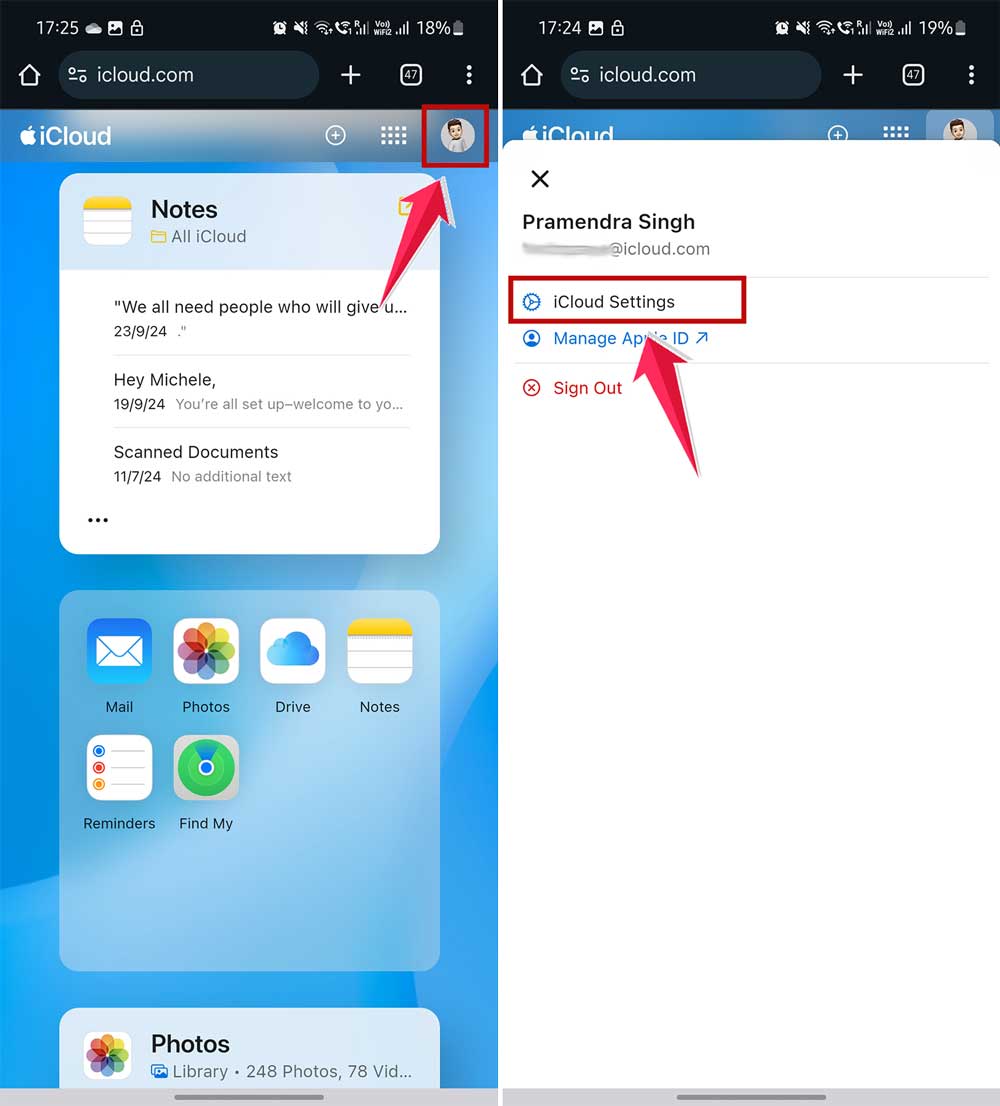
Remember, iCloud.com officially supports multiple browsers, including Safari, Firefox, Chrome, Edge, and Opera, so you’ve got plenty of options!
How To Add iCloud Shortcuts To Your Android Home Screen?
If you’re looking for a smoother, more native-like experience with iCloud on your Android, setting up home screen shortcuts to your favorite iCloud web apps is super easy. It’s similar to changing app icons on your Android device for a more personalized look.
Just follow these simple steps to get started:
- Launch the Chrome browser on your Android device.
- Head over to iCloud.com and click on Sign in.
- Once logged in, open any iCloud web apps you use frequently.
Now, Create a Shortcut On the Android Home Screen:
- Tap on the three-dot menu button in the top-right corner.
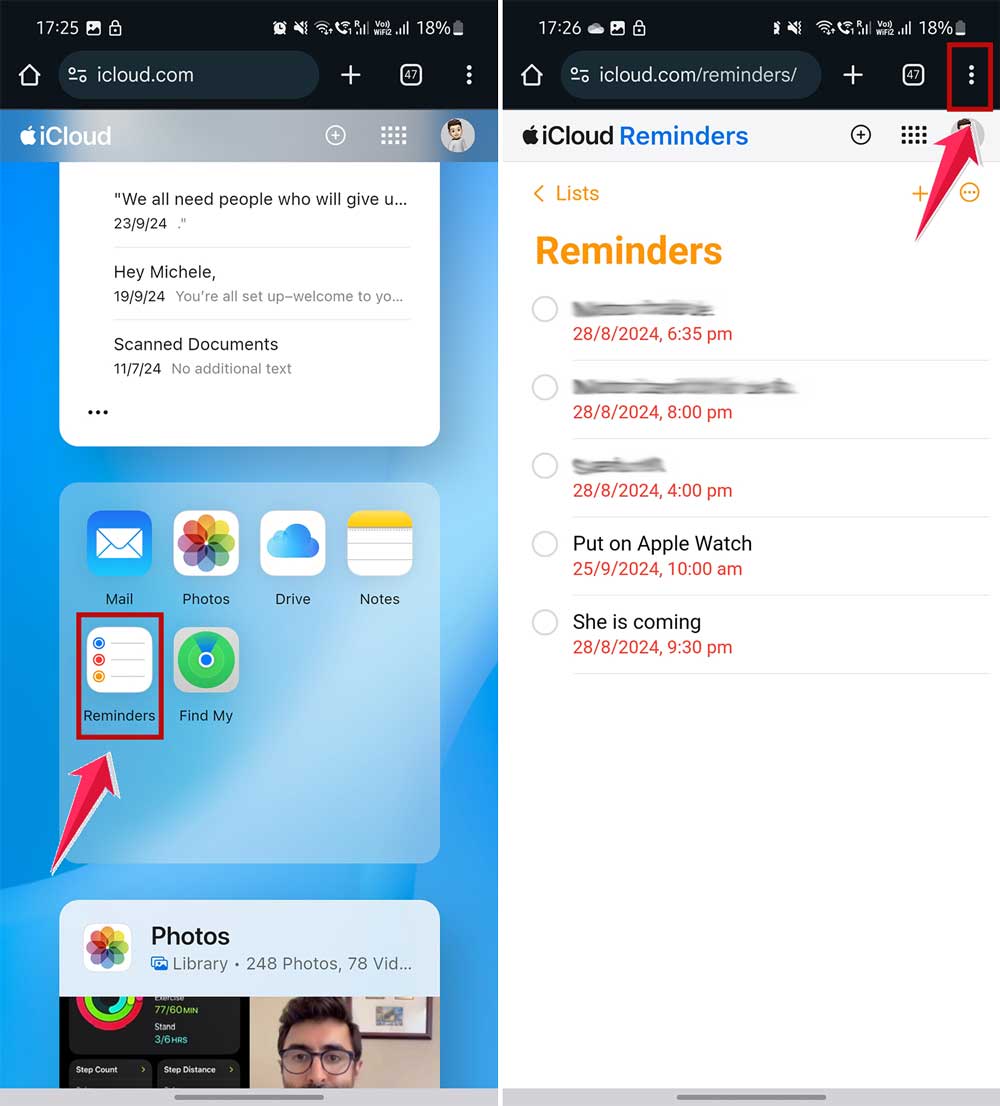
- Select Add to Home screen.
- Enter a name for your shortcut.
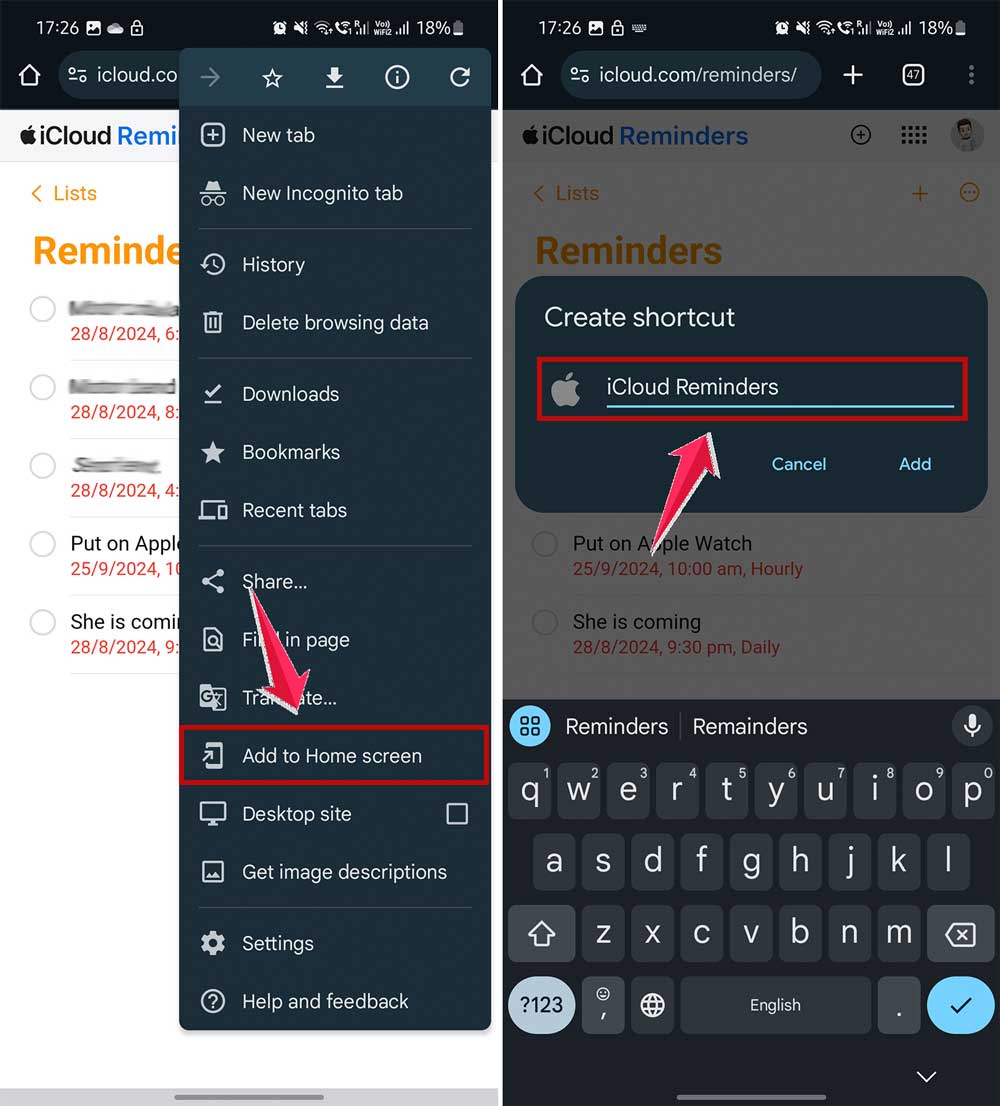
- Then tap on Add.
- Confirm by selecting Add to Home screen again.
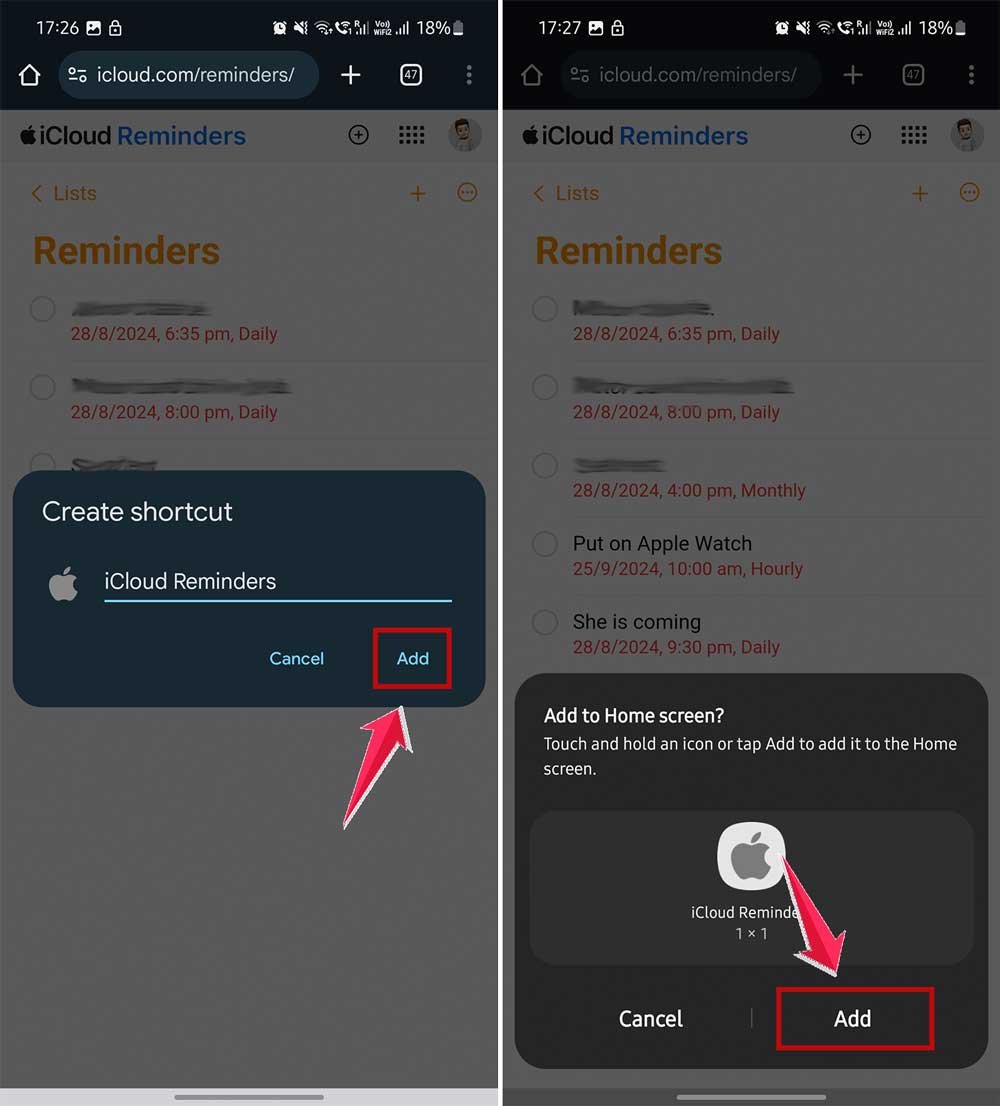
Now, you can access iCloud like any other app from your Android home screen. It’s a great way to streamline your workflow and keep your most-used apps at your fingertips!
What Can and Can’t You Do with iCloud on Android?
When you access iCloud on your Android device, you’ll find that some features are available while others aren’t. It’s a bit like how using Apple iCloud on your Android device has its limitations.
Let’s break it down for you:
What you can do:
- Access iCloud Mail: You can check and send emails using your iCloud account.
- Use iCloud Calendar: Keep track of your events and appointments.
- Manage iCloud Contacts: View and edit your contact list.
- Create and edit Notes: Jot down ideas or make to-do lists.
- Use Find My iPhone: Locate your Apple devices if they’re lost.
- Access iCloud Drive: View and download files stored in your iCloud Drive.
What you can’t do:
- Sync photos: Unfortunately, you can’t automatically sync photos from your Android device to iCloud.
- Use iMessage: This Apple-exclusive messaging service isn’t available on Android.
- Access certain apps: Some Apple-specific apps like Pages, Numbers, or Keynote won’t work.
- Use Apple Pay: This feature is limited to Apple devices only.
- Automatic backups: Your Android device won’t automatically back up to iCloud.
How To Use iCloud On Android With Full Power?
If you’re looking for a better way to use iCloud on your Android device, you’re in luck.
A company called io.mt has developed a suite of apps that can significantly improve your iCloud experience.
io.mt provides several apps that bring iCloud functionality to your Android device:
- Sync for iCloud: Access your iCloud Photos and files easily. You can view and manage your media and documents from your Android phone.
- Sync for iCloud Email: Check your iCloud Mail without using a browser. This app gives you direct access to your iCloud email account.
- Sync for iCloud Contacts: Keep all your contacts in sync and easily accessible.
- Sync for iCloud Calendar: View and manage your iCloud Calendar information effectively.
- Sync for iCloud Notes: Access and edit your iCloud Notes seamlessly.
- Sync for iCloud Reminders: Stay on top of your to-do lists.
- Sync for iCloud Drive: Manage your iCloud Drive files directly from your Android device.
You can straightforwardly use these apps. Download the ones you need from the Google Play Store and log in with your iCloud account.
And it is free. All these apps are free, giving you access to your iCloud data without any extra cost.
Wrapping It Up
While iCloud on Android isn’t perfect, it’s a good start if you use Apple services on your Android device. You can access basics like your photos, files, emails, and calendars through the web interface. It’s another way to set up a new Android from an old phone if you’re switching from iPhone.
Want a smoother experience? Try the free third-party apps from io.mt. They offer easier access to iCloud services like photos, emails, contacts, and calendars on your Android device.
The tech world is always changing, and we might see better integration between different platforms in the future.
For now, these tools and tips can help you use iCloud services on your Android device more easily. It’s not ideal, but it’s a way to bridge the gap between Apple and Android worlds.