Have you ever sent a Snap and wished you could see it again? You’re not alone. Every day, millions of Snapchat users wonder about their past Snaps and messages.
Maybe you’re trying to remember a conversation with a friend, or you want to revisit a funny moment you shared. Whatever your reason, it’s natural to be curious about your Snapchat history.
Here’s the thing: Snapchat is designed for quick, temporary communication. But that doesn’t mean all your data vanishes into thin air. In fact, you can access more of your Snapchat history than you might think.
In this guide, we’ll show you exactly how to view your past Snaps and chats. You’ll learn about the different types of data Snapchat stores and how to access them.
Whether you’re looking for a specific memory or just curious about your Snapchat activity, we’ve got you covered. Let’s get started and unlock your Snapchat history!
How to see your Snapchat history
While you can’t see every Snap you’ve ever received, you can access some interesting information about your Snapchat activity. This data, called metadata, includes details about the Snaps you’ve sent and received.
Remember, Snapchat is all about temporary sharing. It deletes Snaps once they’re viewed or expired, and unopened Snaps disappear after 30 days. But don’t worry, you can still get a glimpse into your Snapchat past. Here’s how to download your Snapchat data:
- Open Snapchat and tap your profile photo in the top left corner.
- Look for the gear icon to open your Settings.

- Scroll down until you see My Data under Account Actions.
- You might need to log in again for security reasons.
- Once logged in, select My Data again.
- Now select which data you want to export or which is not. After selecting, scroll down and click “Next”
- Now, Confirm the email address where you want to receive your Snapchat history.
- You might also export data according to a specific date range.
- Hit Submit Request. Snapchat will send you a confirmation email.

- Check your email and click the link from Snapchat’s support team.
- Log in and follow any steps to verify your identity.

- On the My Data page, download your data as a ZIP file.
- Open the ZIP file and click index.html to view your Snap history.
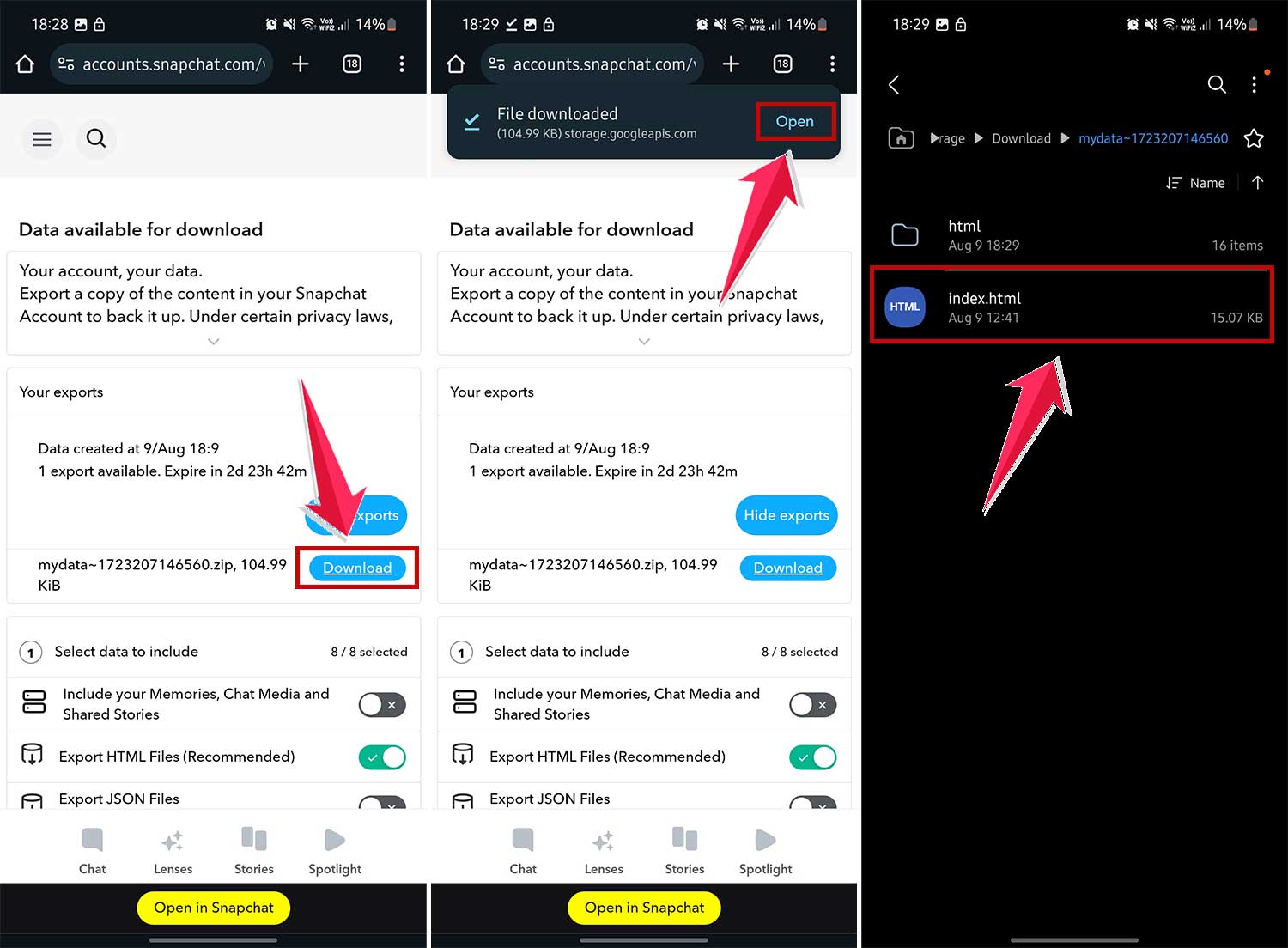
Here’s a handy tip: It’s easier to open the ZIP file on a computer, but you can also save it to a cloud drive on your phone for easy access.
What you can find in your Snapchat history
Ever wondered what secrets your Snapchat history holds? When you download your data from the My Data page, you’ll get a peek into your Snapchat past. Here’s what you can expect to find:
- Snap History: This shows details about the Snaps you’ve sent and received. It’s like a log of your Snapchat activity.
- Saved Chat History: Remember those conversations you didn’t want to forget? You’ll find them here.
- Search History: Curious about what you’ve been looking for on Snapchat? This section has the answers.
- Memories: All those special Snaps you’ve saved will be here, ready for a trip down memory lane.
- Purchase & Shop History: If you’ve ever bought anything through Snapchat, you’ll see the details here.
- Subscriptions: A list of all the accounts you’ve subscribed to on Snapchat.
Now, it’s important to remember that Snapchat is all about privacy. Most of your Snaps and chats disappear after they’ve been viewed. But some things, like your Stories and location info, might stick around a bit longer.
Oh, and here’s a handy tip: If you save images as Memories, you can download them. Just remember, the download links for your data only last for seven days after Snapchat creates the file. So don’t wait too long to check it out!
By looking through this data, you’ll get a fascinating glimpse into how you use Snapchat. It’s like a digital scrapbook of your Snapchat journey!
The takeaway
Now you know the secret to peek into your Snapchat past. It’s not about seeing every Snap you’ve ever sent but about understanding your overall Snapchat story.
By downloading your data, you can revisit snippets of your digital history – from your Snap patterns to your saved chats. It’s like flipping through a scrapbook of your Snapchat journey.
Remember, Snapchat still values your privacy. Most of your Snaps and chats vanish as usual. This feature just gives you a bird’s-eye view of your Snapchat life.
So, why not give it a try? Follow the steps we’ve outlined and explore your Snapchat data. You might discover interesting patterns or relive forgotten moments. It’s your Snapchat story – take control and see what it reveals about you!
What will you find in your Snapchat history?