Are you trying to figure out how to add captions to your Instagram stories? You’re not alone. Millions of Instagram users are searching for this exact information right now.
Maybe you want to make your stories more accessible to deaf or hard-of-hearing followers. Or perhaps you’ve noticed that many of your viewers watch stories with the sound off. Whatever your reason, adding captions is a smart move – just like knowing how to fit your whole picture on Instagram.
Here’s the good news: it’s easier than you might think. In this guide, you’ll find simple, step-by-step instructions to add captions to your Instagram stories. Whether you’re using an iPhone or Android, we’ve got you covered.
Ready to make your Instagram stories more engaging and inclusive? Let’s get started with adding those captions!
Why captions are great for your Instagram stories
You might wonder why you should bother adding captions to your Instagram stories. Well, there are some really good reasons to do so.
1. Captions help viewers watch without sound
Ever scrolled through Instagram in a quiet place? Many people watch stories with the sound off, especially in public or at work. When you add captions, you’re making sure everyone can enjoy your content, no matter where they are.
2. Captioned stories boost your engagement
When people can easily understand what you’re saying, they’re more likely to watch your whole story and interact with it. This means you might see more replies, reactions, and shares on your captioned stories. It’s another way to boost engagement, similar to mastering direct messages on Instagram.
3. You show you care about all your followers
By adding captions, you’re making your content accessible to deaf or hard-of-hearing followers. It’s a simple way to show that you value every member of your audience.
4. Your message comes across clearly every time
Sometimes, background noise or accents can make speech hard to understand. Captions ensure that your exact words are right there on the screen, so there’s no confusion about what you’re saying.
5. Viewers remember your content better
Did you know people often remember information better when they both see and hear it? By adding captions, you’re helping your message stick in viewers’ minds long after they’ve watched your story.
6. Captioned stories stand out in a crowded feed
In the sea of content on Instagram, captioned stories can catch the eye as people scroll. It’s an easy way to make your stories more noticeable and increase the chances that people will stop to watch.
How to add captions to your Instagram story
Adding captions to your Instagram stories is easy and fun. Here’s how you can do it:
- Open Instagram and tap your profile picture to start a new story.
- Record a video or upload one from your phone. If you’re looking to make your stories even more eye-catching, you might want to learn how to change your Instagram icon, too.
- Tap the sticker icon at the top of your screen. It looks like a square smiley face.
- Find and tap the Captions sticker. Instagram will automatically write out what’s being said in your video.
- You can change how the captions look:
- Tap the words to change the color.
- Pinch to make the captions bigger or smaller.
- Drag to move them around the screen.
- If you see a mistake, just tap the word and fix it.
- When you’re happy with your captions, tap Send To to share your story.
That’s all there is to it! Now, your story is easier for everyone to enjoy, whether they’re watching with sound on or off.
How to turn on automatic captions
If you want captions on all the stories you watch, you can turn them on in your settings. Here’s how:
- Go to your profile by tapping your picture in the bottom right.

- Tap the three lines at the top right to open the menu. This menu is a treasure trove of settings – it’s also where you’d go to change your profile picture if you were using TikTok.
- Scroll down and click on Accessibility and Translations.
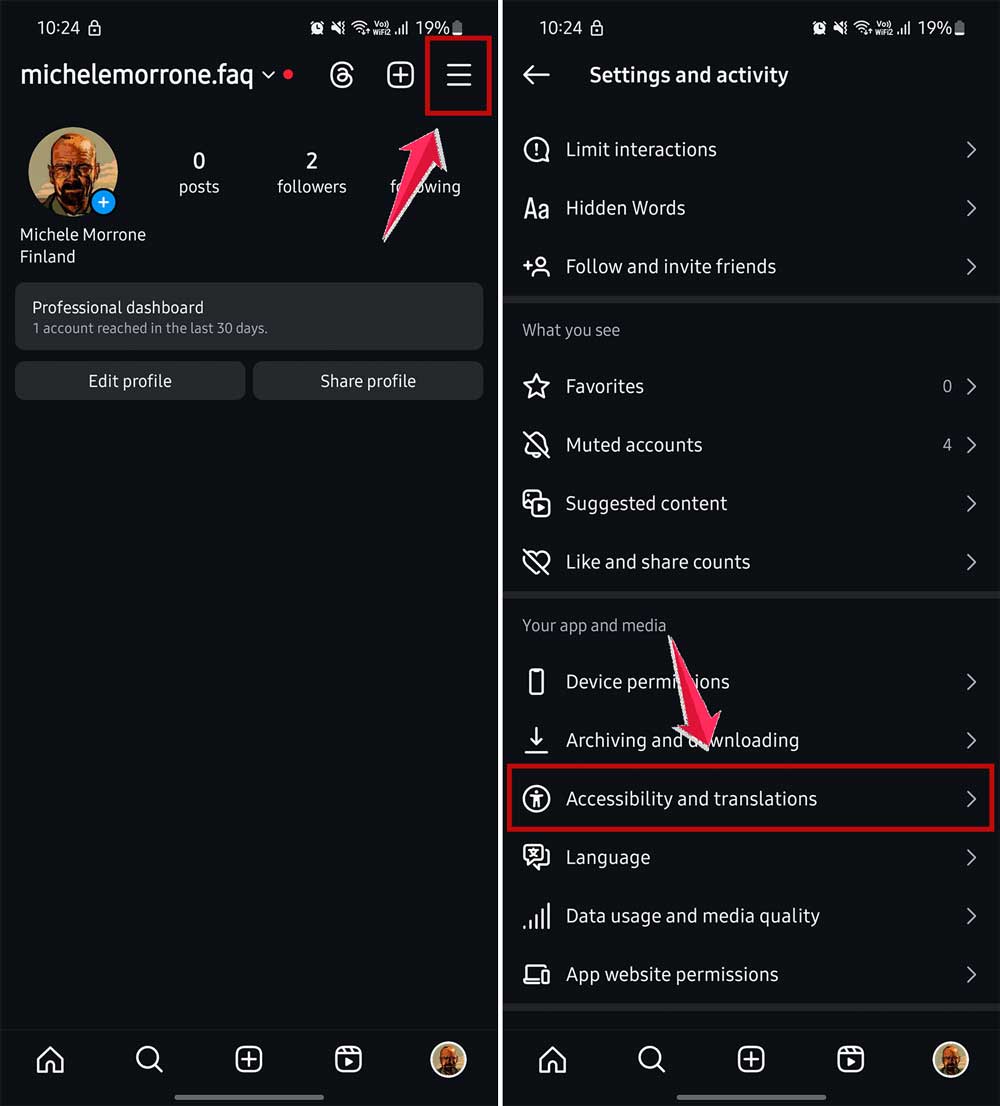
- Find Captions and switch it on.

Now, you’ll see captions on videos, even if the person who made the video didn’t add them. This way, you won’t miss out on anything being said in the stories you watch.
The takeaway
Let’s wrap this up, shall we? You’ve learned a powerful new skill for your Instagram toolkit. Adding captions to your stories isn’t just a nice gesture—it’s a smart move that can transform your content.
Think about it: your followers can now enjoy your stories anywhere, anytime. Whether they’re in a quiet office or on a noisy bus, your message comes through loud and clear. And for those who are deaf or hard of hearing? You’ve just made your content accessible to them, too.
But here’s the real kicker: captioned stories tend to get more engagement. People are more likely to watch them all the way through and interact. Plus, they stand out in a crowded feed, making your content more noticeable.
So, why not give it a shot? Your next story could be the one that boosts your engagement and grows your audience. Remember, it’s all about connecting with your followers. Captions are just one more way to make that connection stronger.
And if you’re really looking to up your Instagram game, you might even want to explore viewing Instagram stories anonymously to get inspiration from other creators.