You don’t have to stick to plain boring texts. WhatsApp has some really cool formatting tricks built in. And they’re super easy to use.
You can make words bold, add italics, strike things out, or even change the font style.
Most people don’t even know these tricks exist. But once you start using them, your chats will feel way more expressive.
Let’s explore every single WhatsApp text trick you should know. And a few fun customizations to go beyond just text.
16 Cool Ways to Format Your WhatsApp Messages
There are many easy tricks to make your texts more engaging. Let’s explore some fun ways to add excitement to your chats.
1. Make Words Bold
If you want to emphasize something. Just put asterisks (*) around your word or phrase.
For example, type important, and it’ll show up as important. It’s a great way to make key points pop!
2. Slant Your Text with Italics
For a subtle emphasis, try italics. Put underscores (_) around your text. Type amazing, and it’ll appear as amazing.
3. Cross Out Words
Sometimes, we need to playfully correct ourselves.
You can use tildes (~) to strike through text. Type oops, I meant hello, and it’ll show up as oops, I meant hello.
4. Change Your Font Style
If you want a different look.
Just use three backticks (“`) before and after your text for a unique font style.
Type ```Hello there``` for a cool, different font.
See, you will now see a new font like never before.
5. Create Bullet Points
While WhatsApp doesn’t officially support formatted bullet points, you can do a simple trick.
Organizing your thoughts? Start a line with an asterisk (*) or hyphen (-) followed by a space to make a bullet point. Like this:
- First point
- Second point
6. Make Numbered Lists
For step-by-step instructions, use numbers.
Just start with “1.” and keep pressing Enter for more numbers.
For example:
- Wake up
- Brush teeth
- Have breakfast
7. Quote Someone
Use the greater-than sign (>) at the start of a line to create a quote block. It’s perfect for repeating what someone else said. For instance:
This is how a quote looks
8. Highlight Text
Put single backticks (`) around words to highlight them differently.
Type `important` to see how it stands out.
9. Use the WhatsApp Menu for Formatting
Not a fan of typing symbols? No problem! You can press and hold text to bring up a menu with formatting options. It’s easier than remembering all the symbols!
10. Mix and Match Styles
Get creative! You can combine different formatting styles on the same word or phrase. Try mixed
11. Try Online Formatting Tools
If you’re working with a lot of text, online tools can help you format it quickly and easily. Just search for “WhatsApp text formatter” to find some options.
12. Underline Your Words
While WhatsApp doesn’t have a built-in underline feature, you can use external tools to create underlined text and paste it into your messages.
13. Adjust Your Font Size
Is the text too small or too big? You can change the font size right in WhatsApp’s settings to make reading more comfortable. Just go to Settings > Chats > Font Size.
14. Add Some Color (Android Only)
If you’re using Android, you can download an app to create colorful text and paste it into WhatsApp. It’s a fun way to make your messages pop!
15. Use Fancy Fonts
Want to write in a completely different style? Try a third-party app to create messages in fancy fonts, then copy and paste them into WhatsApp.
16. Get Creative with Emojis
For a really playful touch, try writing entire messages using just emojis. Instead of “Good morning, have a great day!“, you could send – 🌅.
Remember, these tricks are all about having fun and expressing yourself. So go ahead, give them a try, and see how they can liven up your chats!
How To Customize WhatsApp App Beyond Text?
Text tricks are just the start of personalizing your WhatsApp experience. There’s so much more you can do to make the app truly yours. Let’s explore some fun ways to customize WhatsApp beyond just text formatting.
#1 Change Your Chat Background
Tired of the same old look? You can easily switch up your chat background to match your mood or style. Here’s how:
- Open a chat.
- Tap the three dots in the top right corner.
- Select “Wallpaper”.
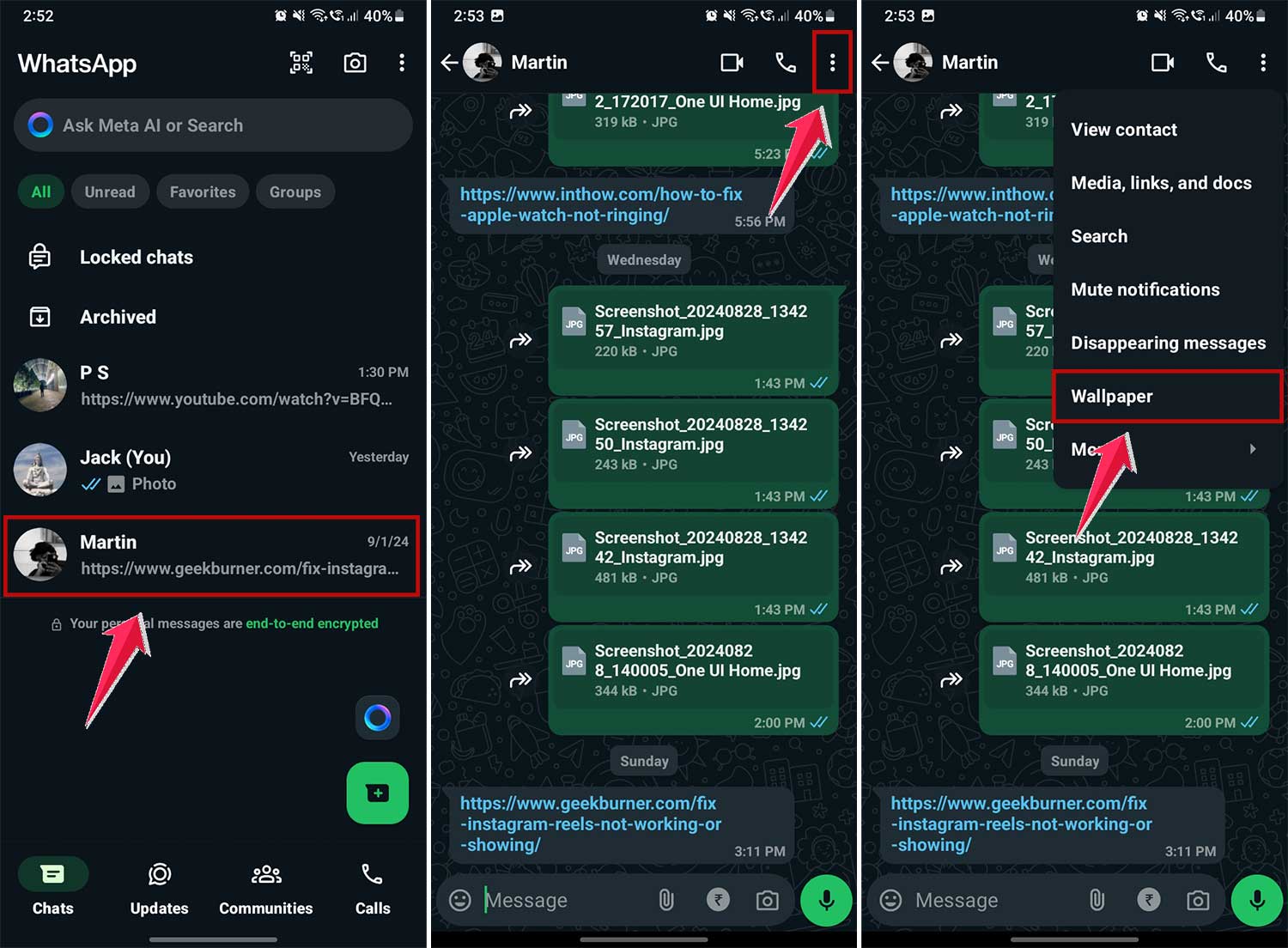
- Now click on “Change” to change the Wallpaper.
- Choose a new background from the options.
- To use your own photo as a Wallpaper, click on “My Photos.”
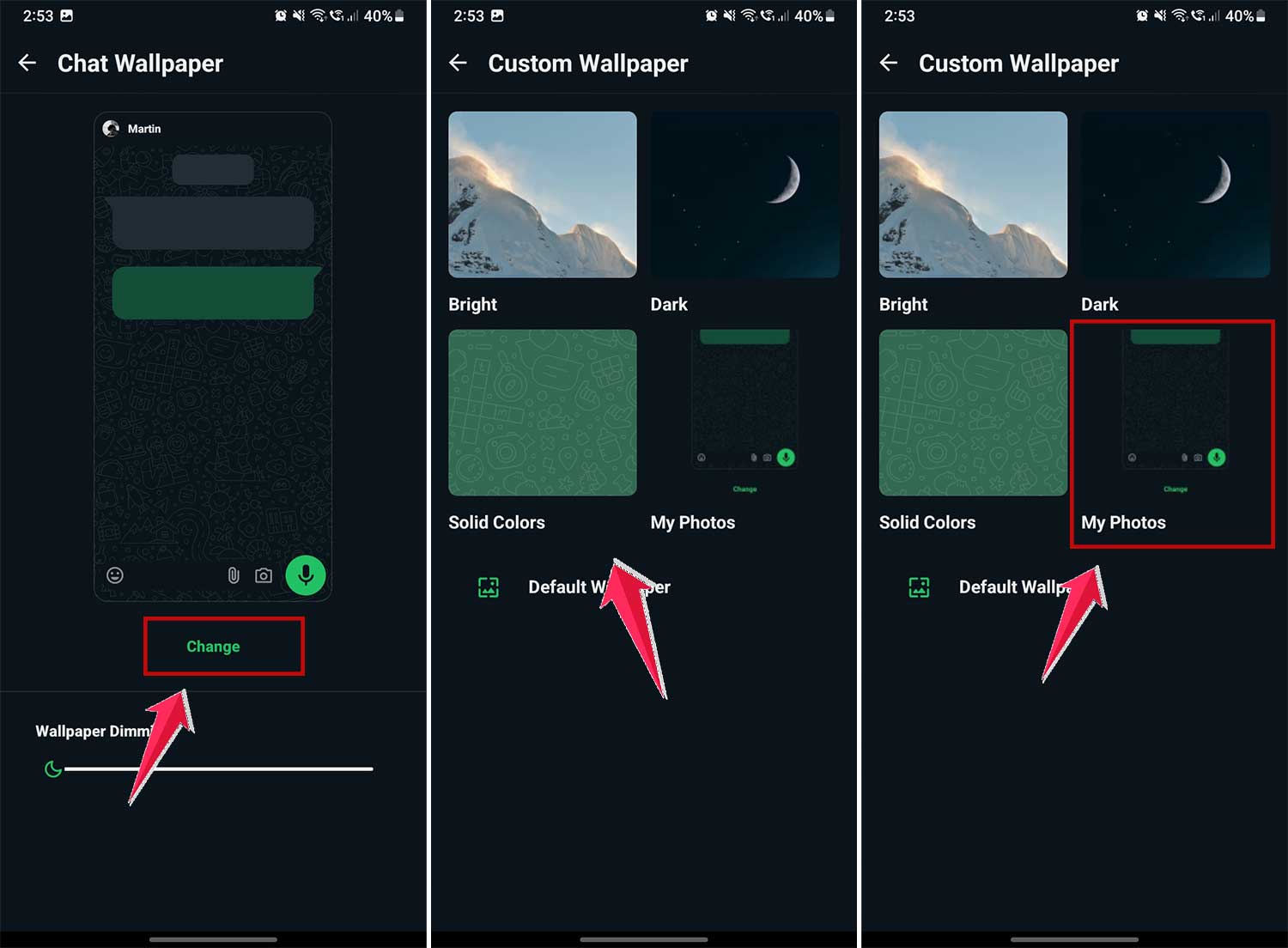
Whether you prefer calming nature scenes or vibrant patterns, there’s something for everyone. A new background can make chatting feel fresh and exciting.
#2 Set Custom Notification Tones
Ever wish you knew who was messaging without looking at your phone? With custom notification tones, you can! To set this up:
- Open a chat with the contact.
- Tap their name at the top.
- Select “Notifications.”
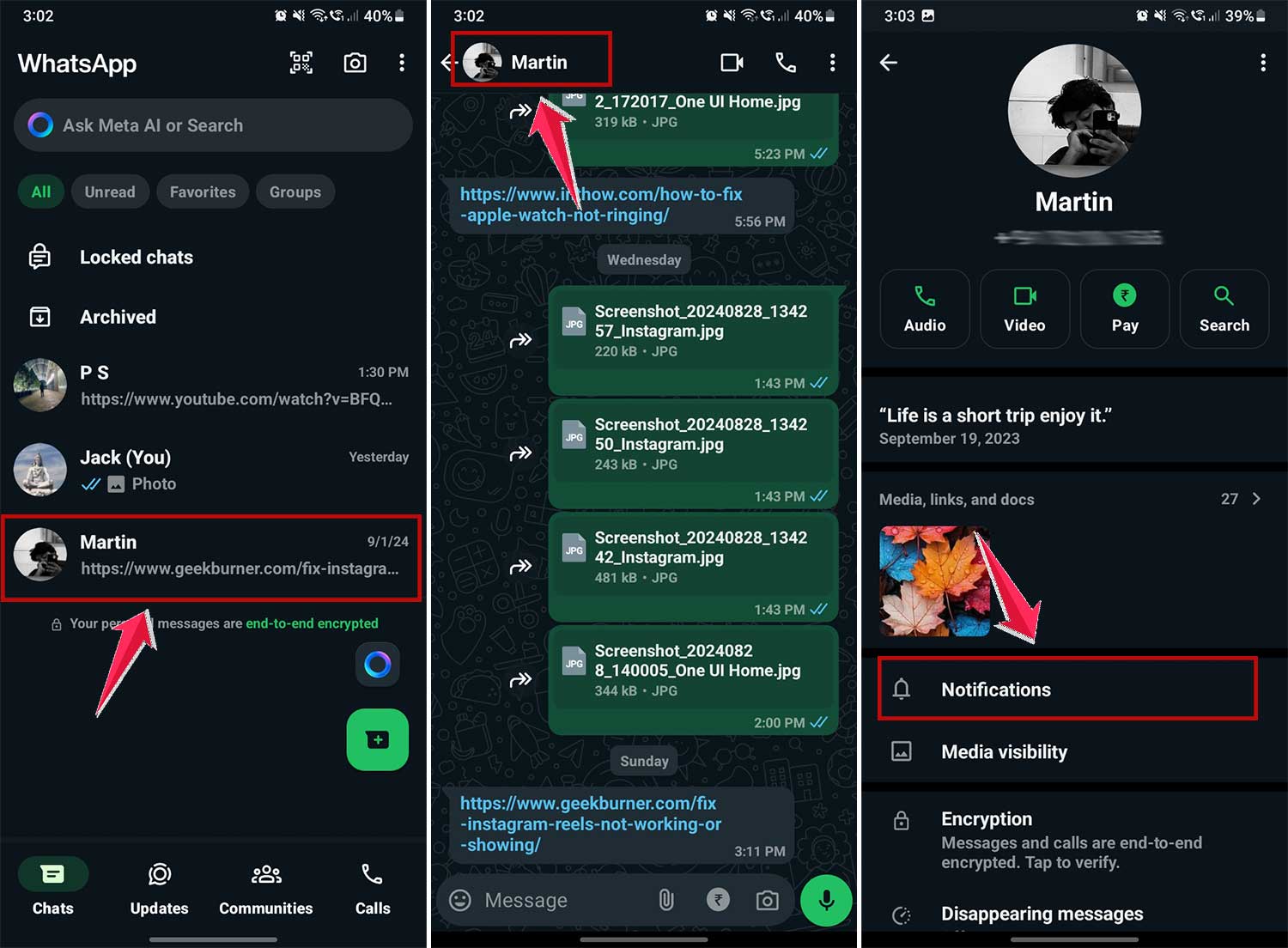
- Then click on “Notification tone”.
- Choose a unique tone for that person.
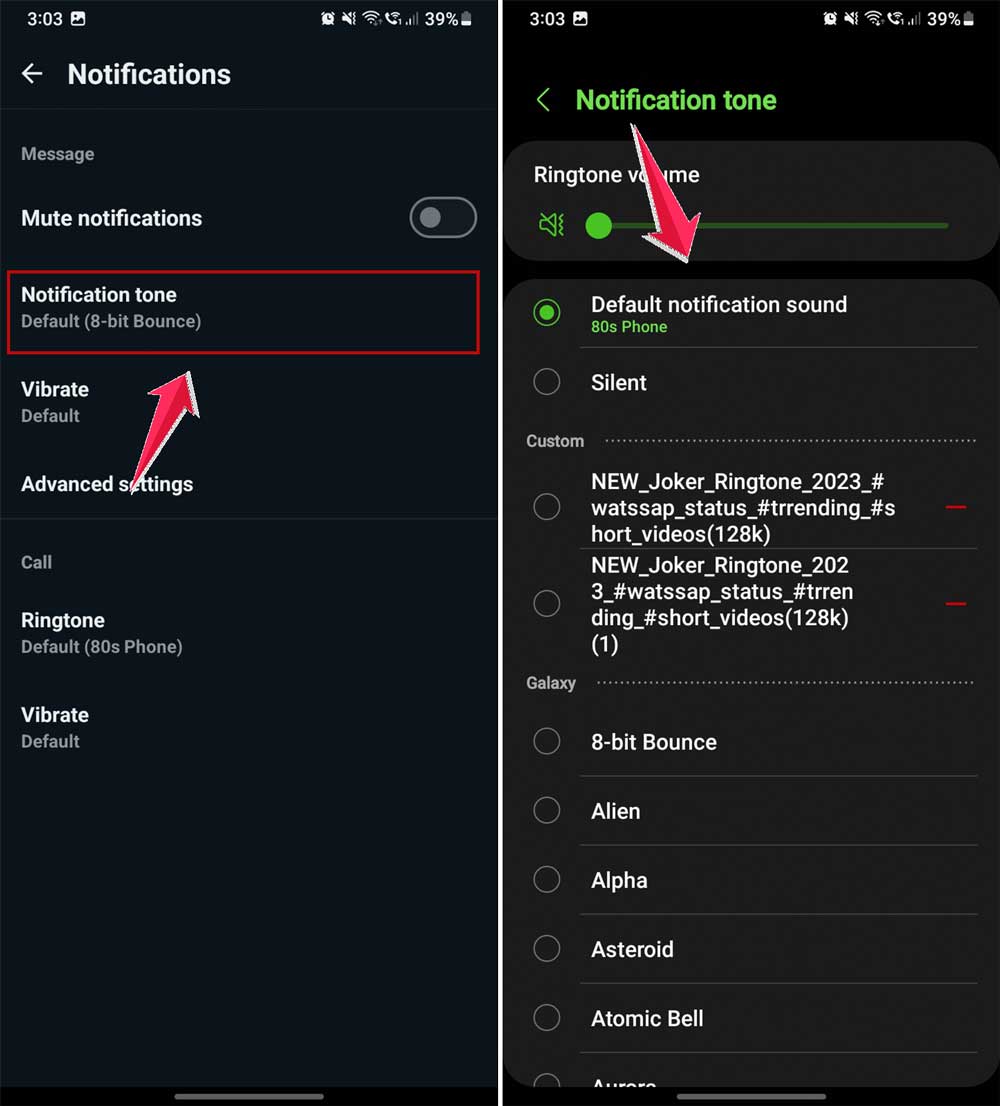
Now you’ll know if it’s your best friend or your boss messaging, just by the sound. It’s a small change that can make a big difference in managing your conversations.
#3 Switch Up Your Typing Language
If you speak multiple languages, WhatsApp has got you covered. You can easily switch between languages while typing. Here’s how:
- When typing, press and hold the space bar.
- Select your preferred language from the pop-up menu.
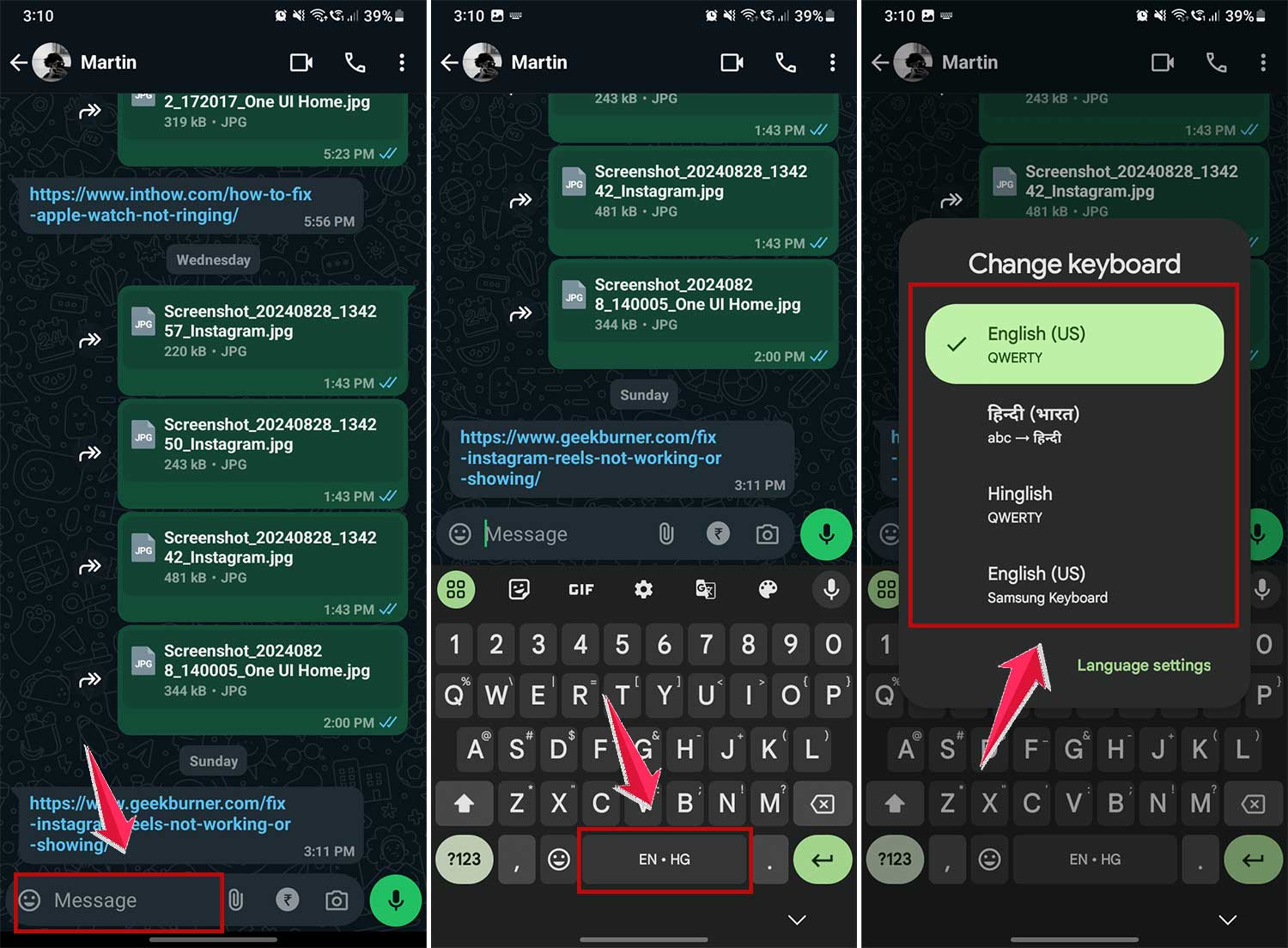
This feature is great for multilingual chats or when you’re learning a new language. It makes communicating in different languages smooth and effortless.
In Conclusion To
You don’t need to stick with boring, plain WhatsApp messages anymore.
You’ve now got 16+ ways to express yourself better. Bold, italics, strikethrough, quotes, emojis, font styles, and even background tweaks.
Whether you’re chatting with friends, wishing someone a happy birthday, or writing a serious message. These tricks will help you say it the way you want.
So go ahead and try them out. Make your chats feel like you.
And if you discover a cool trick we missed, you know what to do. Share it and keep the creativity flowing. Let WhatsApp be your playground.