You’ve been messaging someone. Suddenly, they stop replying. No “seen” tag. No response. No activity. You start to wonder… Did they restrict you on Messenger?
If you’re feeling confused, you’re not alone. Facebook’s “Restrict” feature can leave you in the dark without telling you. It’s not the same as being blocked. And that’s what makes it tricky.
But don’t worry. You’re about to learn how to tell if someone restricted you, what it means, and what you can do about it.
Let’s start with the basics.
What does restrict mean on Messenger?
When someone restricts you on Messenger, they don’t block you.
You can still send messages. You just won’t know if they read them, or if they’re even seeing them at all.
Let me tell you what happens when someone restricts you.
- Your messages go into their Message Requests, not their main inbox
- They don’t get notifications when you message or call
- You can’t see if they’re active or when they were last online
- You may not be able to see their profile picture updates
- You can still send messages, but they’ll be ignored unless they open the request

So it’s like a quiet “mute” that keeps things distant. And unless you know what signs to look for, you may never even realize it happened.
Signs someone restricted you on Messenger
1. Your messages are stuck on “sent”
You send a message. It shows the little blue circle with a checkmark. It means it was sent. But it never turns into the second checkmark that shows it was delivered.
If days go by and the message is still “sent” and not “delivered,” that’s a strong sign you’ve been restricted.
Messages still send, but they sit quietly in their message requests folder. And may never be seen.
2. You can’t see their active status anymore
You used to see when they were “Active now” or “Active 2 hours ago.” Now? Nothing.
That green dot is gone. The last seen is missing. It’s like they disappeared.
When you’re restricted, you lose access to their active status.
But keep in mind. They could’ve also turned off their active status manually. So don’t rely on this one alone.
3. Your calls don’t go through
You try to voice call or video call them on Messenger. It rings and rings on your end… but no answer. You try again. Still nothing.
That’s because their phone never rang. Calls from restricted contacts go silent. They don’t even know you tried.
If this keeps happening, they usually respond. There’s a good chance you’re restricted.
4. You don’t see the new profile picture or updates
You used to see their new profile photos or cover photos. Now? Nothing’s changed.
If they’ve updated their profile picture and you’re the only one who can’t see it, it could mean you’ve been restricted.
Sometimes, they’ve just set their profile to “Only Me” or “Friends.” But if others can see it and you can’t. That’s a clue.
5. Mutual friends can still see everything
Want a way to test it?
Ask a mutual friend to check:
- Can they see the person’s active status?
- Can they see the profile picture?
- Can they message or call them?
If your friend can do all that and you can’t. Then yes, you’ve likely been restricted.
This is one of the most accurate ways to confirm it.
6. You only see old posts on Facebook
You can still go to their profile. You see older posts and photos. But nothing new shows up. It’s like their feed stopped. Only for you.
They didn’t block you. But they probably restricted you on both Facebook and Messenger.
You’re still friends. But you’re being filtered out of their updates.
How to restrict someone on Messenger
If you have decided to limit your friend on Messenger, then do this.
These steps are the same whether you use a smartphone with the iPhone or Android system.
- Open Facebook Messenger and find the conversation with whom you want to limit.
- Tap at the top of the conversation on that person’s name.
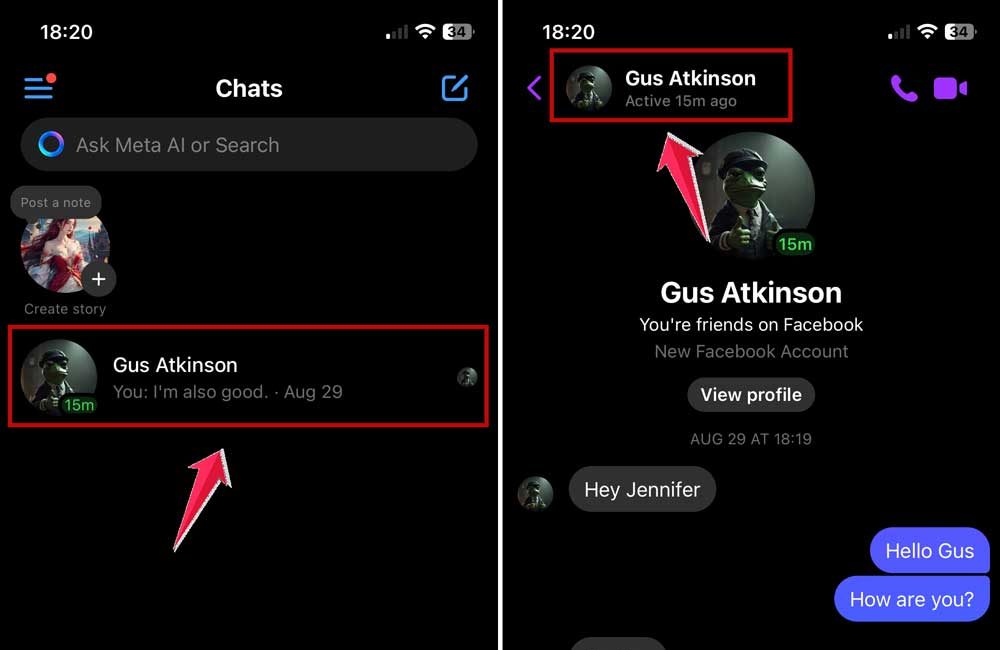
- This will open their profile settings up Scroll down until you see the “Restrict” option.
- Tap “Restrict” and confirm your choice if prompted.
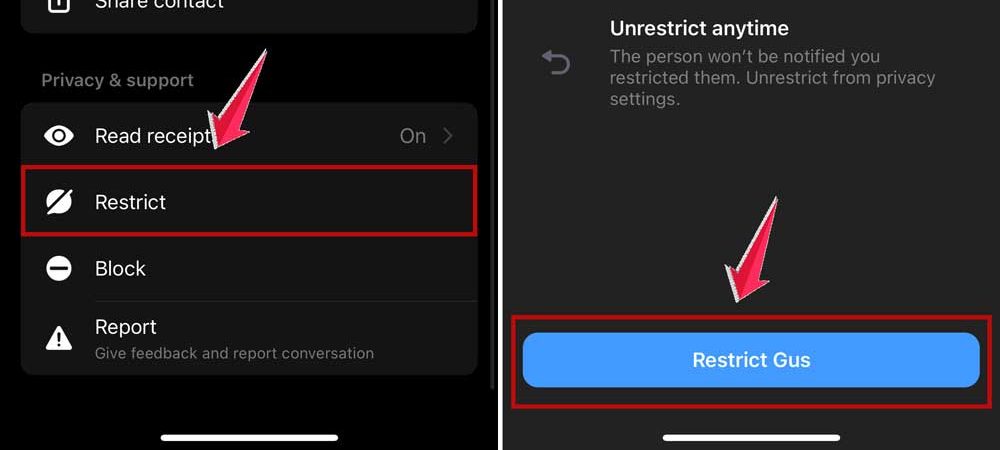
That’s it.
Now that person won’t know when you’re active. They won’t see if you’ve read their messages. And their messages will land in your message requests. Silently.
This is a great option if you want space without fully blocking someone.
How to check messages from restricted contacts?
If you have restricted contact and you want to see if they have actually sent you a message, here’s how to find them:
- Open your Messenger app.
- Tap your profile picture or three horizontal lines in the top left.

- Scroll down and locate “Message Requests”.
- Tap “See filtered requests”.
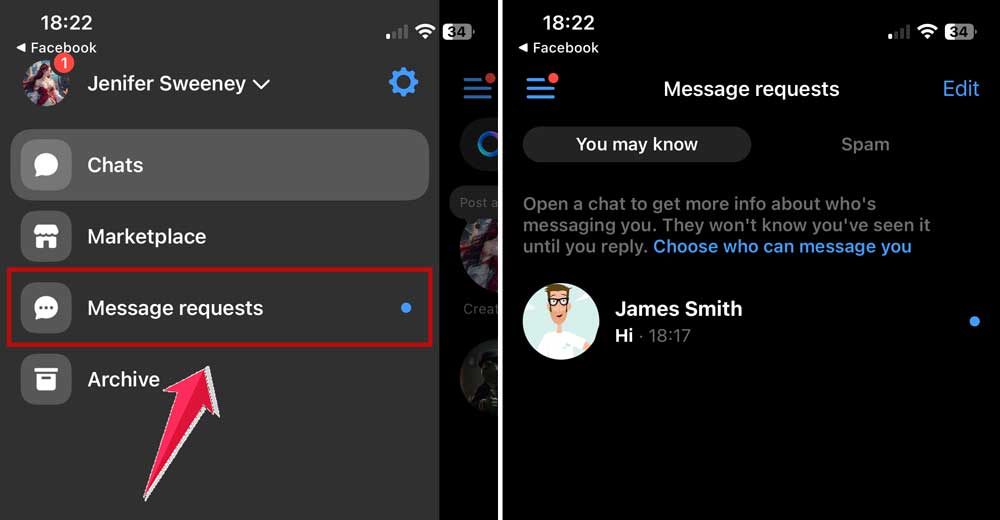
Look for any conversation with people you’ve restricted.
That’s it! And so you keep unwanted messages out of your main chat list, yet have an option to open them when you feel like it.
What to do if someone has restricted you
So you’re pretty sure someone restricted you. Now what?
You’ve got a few options.
You can try a different platform
Maybe they’re still active on WhatsApp, Instagram, or regular SMS. Reach out there and ask politely if everything’s okay.
Sometimes people restrict themselves without realizing it. Or they just needed space.
You can contact them through a mutual friend
If you share a friend, ask them to reach out for you. They might help clear up any misunderstanding.
Just keep it respectful. You don’t want to come off as pushy or invasive.
However, sometimes, people restrict you because they’re overwhelmed. Or they need a break. Or they don’t know how to say they need space.
You may feel ignored. But it might not be about you personally.
Give it some time. And if things feel right later, try reconnecting gently.
Can you undo being restricted?
Not directly.
You can’t remove yourself from someone’s restricted list.
But if they choose to unrestrict you, you’ll start seeing their active status again. Your messages will start delivering. And you’ll be back in their chat inbox.
You won’t get a notification when that happens. So you’ll have to notice the signs changing.
How to know if you’re restricted vs. blocked
You might wonder: “Am I blocked or just restricted?”
Well, knowing this is actually very simple.
If you’re blocked, you won’t be able to message or call them at all.
And if you’re restricted, your messages go through. But they land in a quiet place, they probably won’t check.
If you can still send messages but don’t get replies, you’re likely restricted.
If your messages can’t be sent at all, you’ve been blocked.
The takeaway
You can’t always know for sure if someone restricted you on Messenger. But you can look for the signs.
If your messages stay stuck on “sent.” If their profile picture disappears. If they never answer your calls. If you can’t see their activity, but a mutual friend can…
Then yes. It’s likely you’ve been restricted.
You can still message. But they probably won’t see it unless they check manually.
If that happens, don’t panic. Take a step back. Give them space. Reach out through another platform. Or talk through a mutual friend if it’s important.
And if you want more control over your own privacy? You can always use the Restrict feature yourself.
Messenger gives you options. How you use them is up to you.