Let’s be honest — sometimes, you just want your Snapchat life to stay private. Maybe you’ve noticed your score going up and you’re thinking, “Do people really need to see this?” If that’s you, I totally get it.
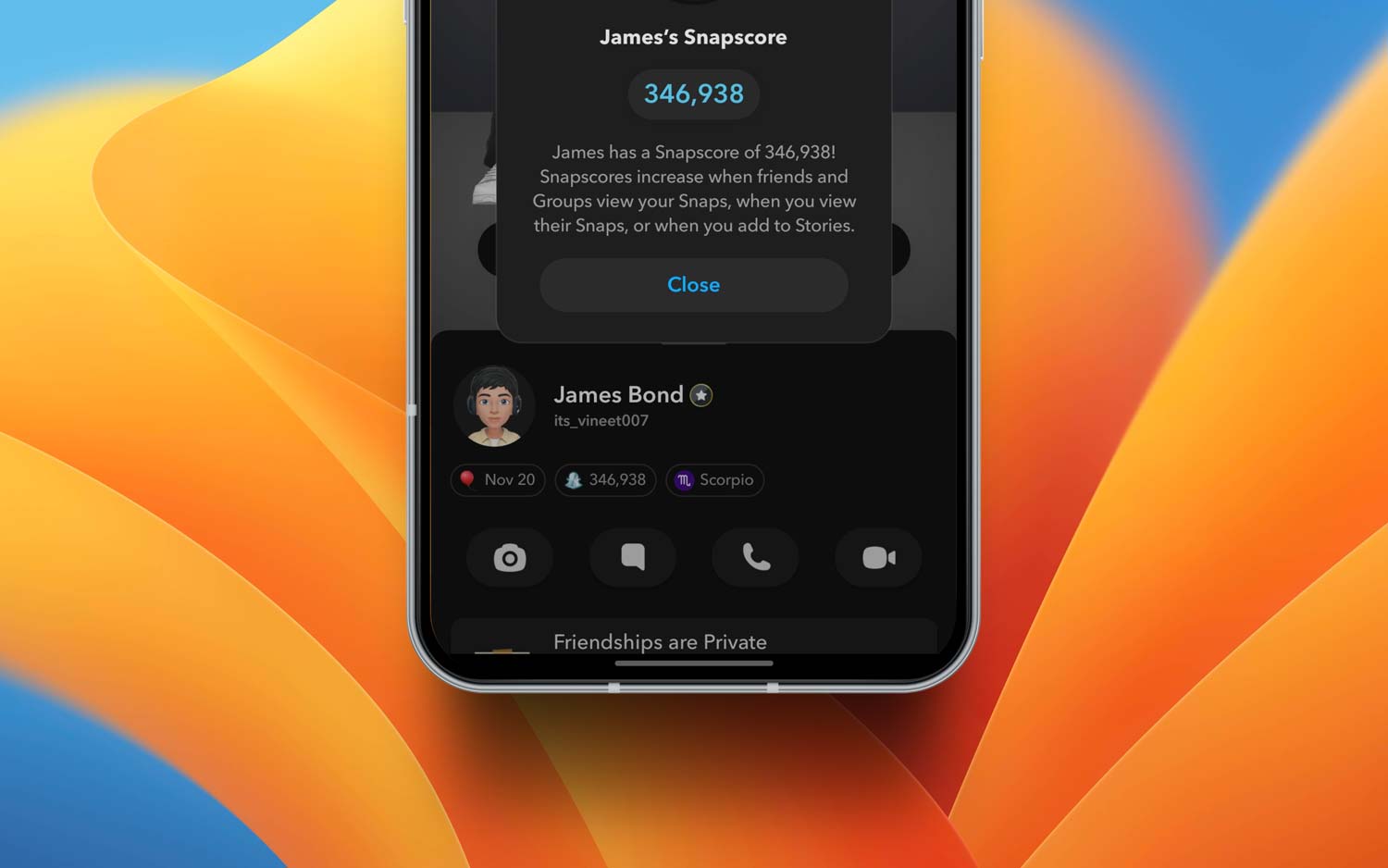
Your Snapchat score is basically a number that shows how much you use the app. It adds up based on how many Snaps you send, receive, and sometimes even open.
Sounds simple, right? But here’s the thing — some people actually judge others based on that number. Weird, I know. But it happens.
And that’s why this matters. Maybe you don’t want everyone to know how active you are. Or maybe you just enjoy using the app without feeling watched.
Either way, your privacy matters. You deserve to use Snapchat your way — no pressure, no judgment.
So, if you’re wondering how to hide your Snapchat score or just make it less visible, I’ve got you.
Let’s break it down together and keep your Snap world as private as you want it to be.
Why you might want to hide your Snapchat score
1. Keep it to yourself
Sometimes, you just don’t want people knowing how much you’re on Snapchat. That’s totally fair.
Your score is personal, kind of like your Snap diary. And if you feel better keeping that to yourself, then do it. You don’t owe anyone an explanation.
2. People can be judgy
Let’s be real — some folks see a high score and jump to conclusions. “Wow, they must be on Snapchat all day,” they might think.
But that’s not always true. Maybe you just like snapping your best friend a lot. Hiding your score helps keep those unnecessary opinions away.
3. It’s your space
You get to decide what people can and can’t see. If showing your score doesn’t sit right with you, then don’t show it.
Simple as that. Your Snapchat is your space, and you’re in control.
So, if any of that sounds like you, it’s okay to take control. You’re not hiding anything bad — you’re just choosing privacy. And that’s always a smart move.
How to keep your Snapchat score hidden
Alright, now that you know why you might want to hide your score, let’s go over how to actually do it.
I’ll walk you through it step-by-step. Don’t worry — it’s easier than you think.
#1 Change your privacy settings
This is the first thing you should do. Snapchat gives you some control over who sees what.
Here’s how to change it:
- Open Snapchat and tap your profile picture at the top left.
- Tap the gear icon in the top right to go into Settings.

- Scroll down to the “Privacy Controls” section.
- Change the settings under “Who Can Contact Me” and “View My Story” to “My Friends” or “Custom”.
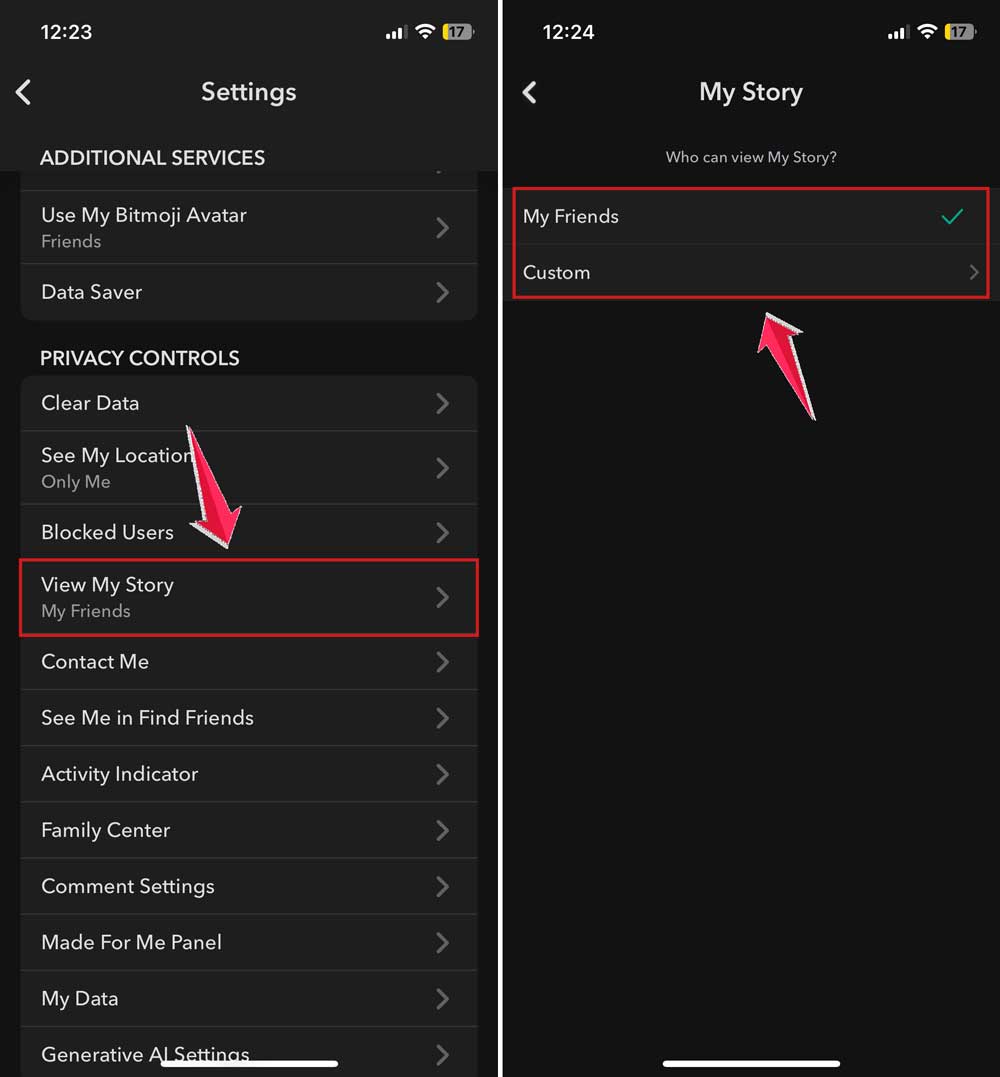
Now, only the people you trust can interact with you, and that limits who can casually check your score.
#2 Remove or block people you don’t trust
Sometimes, it’s not about hiding your score from everyone — just from certain people. If there’s someone you don’t feel comfortable with, it’s okay to unfriend or block them.
Here’s what to do:
- Go to your Friends List.
- Tap on the person’s name.

- Then tap again on the person’s name.
- Tap the three dots in the top right corner.

- Now tap on Manage Friendship.
- Choose “Remove Friend” or “Block”.

This helps clean up your space. Only keep the people who respect your privacy.
#3 Turn on Ghost Mode
Ghost Mode mainly hides your location, but it also gives you more control over who sees what.
Here’s how to turn it on:
- Tap your profile icon again.
- Then tap on the gear icon to open Settings.
- Go to “See My Location” in Settings.
- Toggle on “Ghost Mode”.
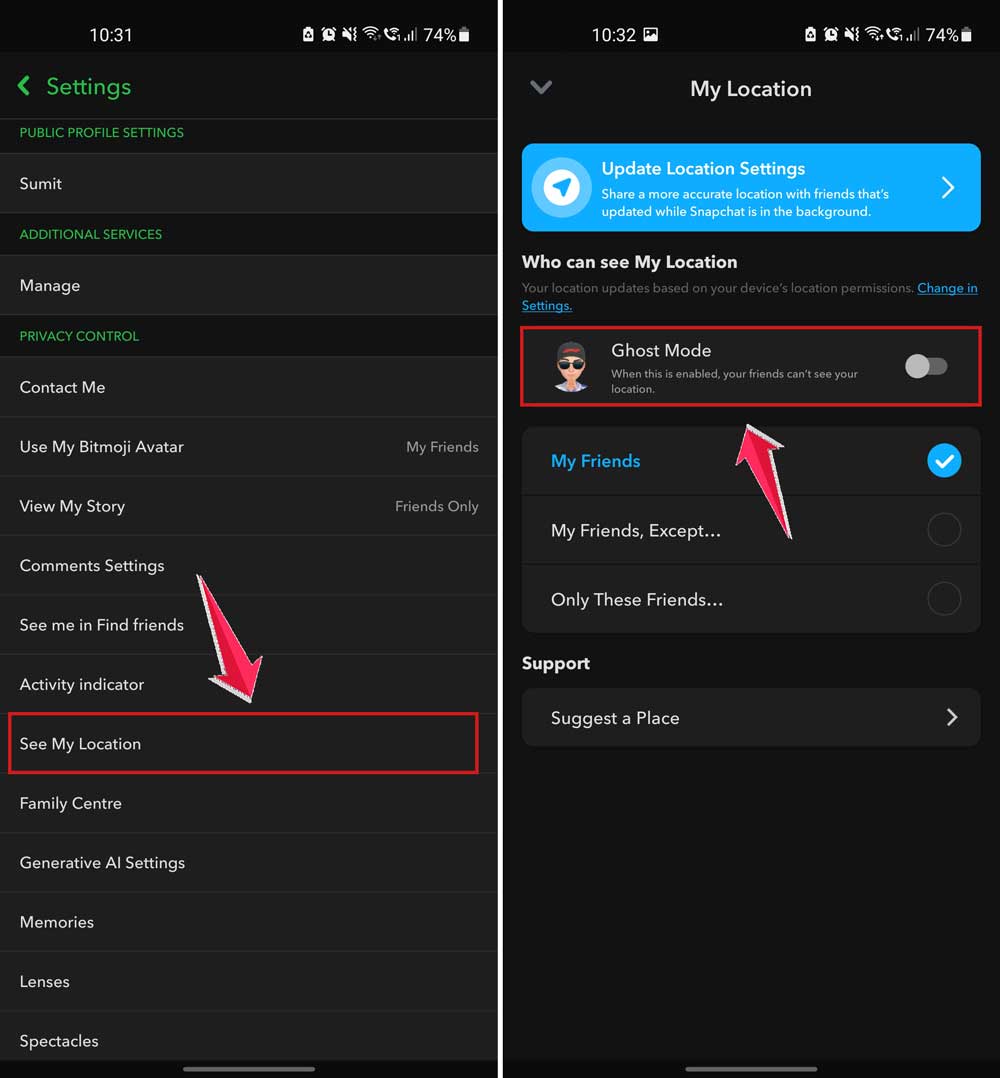
This way, you’re not broadcasting your location — and you’re being more private overall. It adds to your peace of mind.
#4 Keep your story private
Don’t forget about your stories. They can say a lot about your activity too. You can control who sees them.
Here’s how:
- Go to Settings.
- Find “View My Story”.
- Tap “Custom” and choose who can see your stories.

Only the people you pick will see what you post. It’s like your own private audience.
#5 Clean up your friend list regularly
This one’s easy to forget but super helpful. Go through your list now and then. If someone doesn’t need to be there, it’s okay to remove them.
Just scroll through your friends. Ask yourself, “Do I still talk to this person?” If not, maybe it’s time to hit remove. Keep it small. Keep it trusted.
#6 Limit who can contact you
You don’t want just anyone sending you Snaps or checking up on you. So, let’s lock that down.
- Head back to Settings.
- Tap “Contact Me”.
- Change it to “Friends”.

Only people you’ve added will be able to reach out. That’s one less thing to worry about.
Other smart tips for staying private
Now that you’ve got the basics down, here are some quick extra tips to keep things even tighter.
1. Keep your app updated
I know updates can be annoying, but they matter. Snapchat often adds new privacy features or fixes bugs in updates.
So, check your app store regularly and hit that update button. It keeps you ahead of any sneaky changes.
2. Be mindful of what you share
It’s easy to overshare when you’re snapping. But think before you post. Does this reveal more than you want?
If yes, maybe skip it. You don’t need to share everything. Less is more sometimes.
3. Check your app permissions
Snapchat asks for permission to use different parts of your phone — camera, location, contacts, and more. It’s smart to review these now and then.
Go to your phone’s settings. Check what Snapchat has access to. If something doesn’t feel right, turn it off. You’re in charge.
4. Stay updated on privacy news
Snapchat changes things from time to time. They might update their privacy rules or add new features.
Keep an eye out for any news or updates. It helps you stay ready and keep your settings just how you like them.
5. Use private chats when needed
If you want to share something quietly, use direct chats instead of posting it to your story or group.
You can even set chats to disappear. It’s a great way to keep things personal and low-key.
The Takeaway
So, you wanted to hide your Snapchat score, and now you know how to do it.
Between changing your settings, cleaning up your friend list, and being smart about what you share, you’ve got the tools to take back your privacy.
Remember, this isn’t about being sneaky. It’s about feeling comfortable. It’s about making Snapchat work for you, not the other way around.
There’s no rule saying you need to share everything, and you don’t owe anyone access to your Snap life.
Your privacy is yours to protect. So go ahead, try these tips, and see how much better it feels when you’re in control.
Got questions or want to share your experience? Drop a comment below — I’d love to hear from you.