

Is your keyboard freezing or crashing every time you tap on an emoji? Annoying, right? One moment, you’re trying to send a smiley face, and the next, your keyboard just stops working.
If that’s been happening to you, you’re not alone. A lot of people are dealing with the same issue. But don’t worry—I’m here to help you fix it.
So, what’s really going on here? Well, there are a few possible reasons. Sometimes, the emoji data on your phone gets corrupted.
Other times, it’s a bug in your system or an outdated keyboard app that’s causing all the trouble. And yes, believe it or not, using too many emojis at once can actually overload your keyboard and make it crash.
Why should you care? Because emojis make your messages more fun, more expressive, and let’s be honest, sometimes they say more than words can.
But when your keyboard shuts down in the middle of a text, it’s frustrating. You lose your flow, your message doesn’t go through, and you’re left staring at a frozen screen.
The good news? You don’t need to be a tech expert to fix this. I’ll walk you through some simple, step-by-step solutions that can get your keyboard working normally again. Ready to fix it? Let’s go.
Why this happens and what you need to know first
Before we jump into the fixes, let’s understand what could be causing the problem. It helps to know what you’re dealing with so you can solve it better.
1. Corrupt Emoji Data: Clean It Up
Sometimes, the emoji files or saved data on your phone get messed up. When that happens, your keyboard can’t handle it and just crashes.
It’s like your keyboard is trying to read a broken file—it doesn’t know what to do, so it stops working. Cleaning out old or bad data can help.
2. System Bugs: Tweak ‘Em Away
Your phone runs on software, and sometimes that software has little bugs hiding in it. These bugs can cause weird problems, like your keyboard crashing when you use emojis.
Updating your phone’s software can squash these bugs and make your phone work better.
3. Emoji Overload: Less Is More
If you’re using a ton of emojis in one message, it could be too much for your keyboard to handle.
It’s like inviting too many people to a small room, things get cramped and stop working. Try using fewer emojis and see if that helps.
4. Outdated Software or Keyboard Apps: Refresh Often
If your keyboard app or your phone’s software is old, it might not play nice with newer emojis. That can cause crashes, too.
Keeping everything updated helps your phone handle emojis better and keeps your keyboard running smoothly.
Okay, now that you know what might be causing the crash, let’s fix it. I’ve got a list of easy steps you can try, and I’ll walk you through each one.
Keyboard crashes when using emoji – try these fixes
Let’s fix this together. I’ll keep it simple and talk you through each step. You don’t need to be a tech expert—just follow along.
#1: Update your keyboard app
First, let’s make sure your keyboard app is up-to-date. If it’s not, it might not work right with the latest emojis or system updates. An outdated app is one of the most common reasons for crashes.
Here’s what to do:
- Open the App Store (iPhone) or Google Play Store (Android).
- Search for your keyboard app (like Gboard or SwiftKey).
- If you see an update button, tap it.
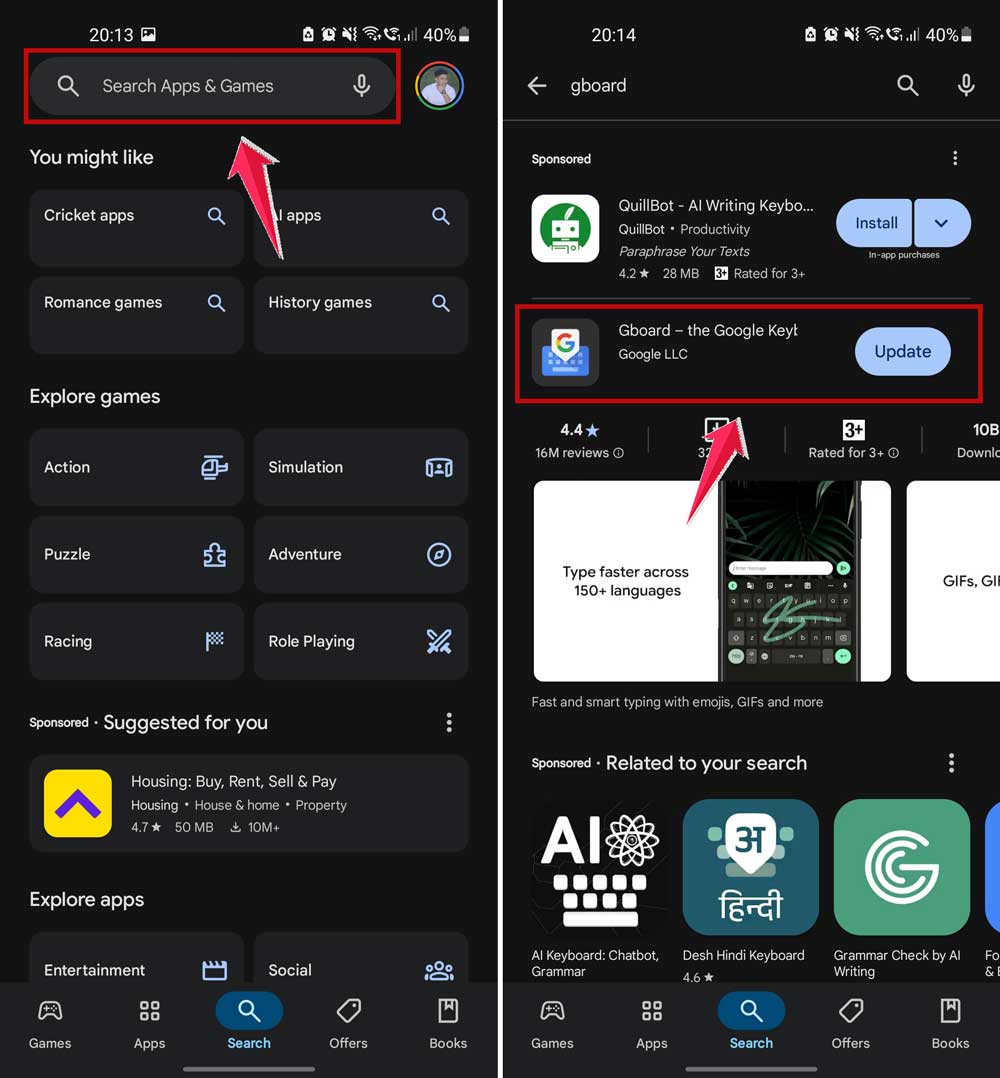
Once the update is done, try using emojis again. If it works—great! If not, let’s move to the next fix.
#2: Clear cache and data
Your keyboard app stores temporary files (called cache) to help it run faster. But sometimes, that cache gets too full or corrupted, and it causes problems. Clearing it out can help.
Here’s how to do it on Android:
- Go to your phone’s Settings.
- Tap Apps or Apps & notifications.
- Find and tap your keyboard app.
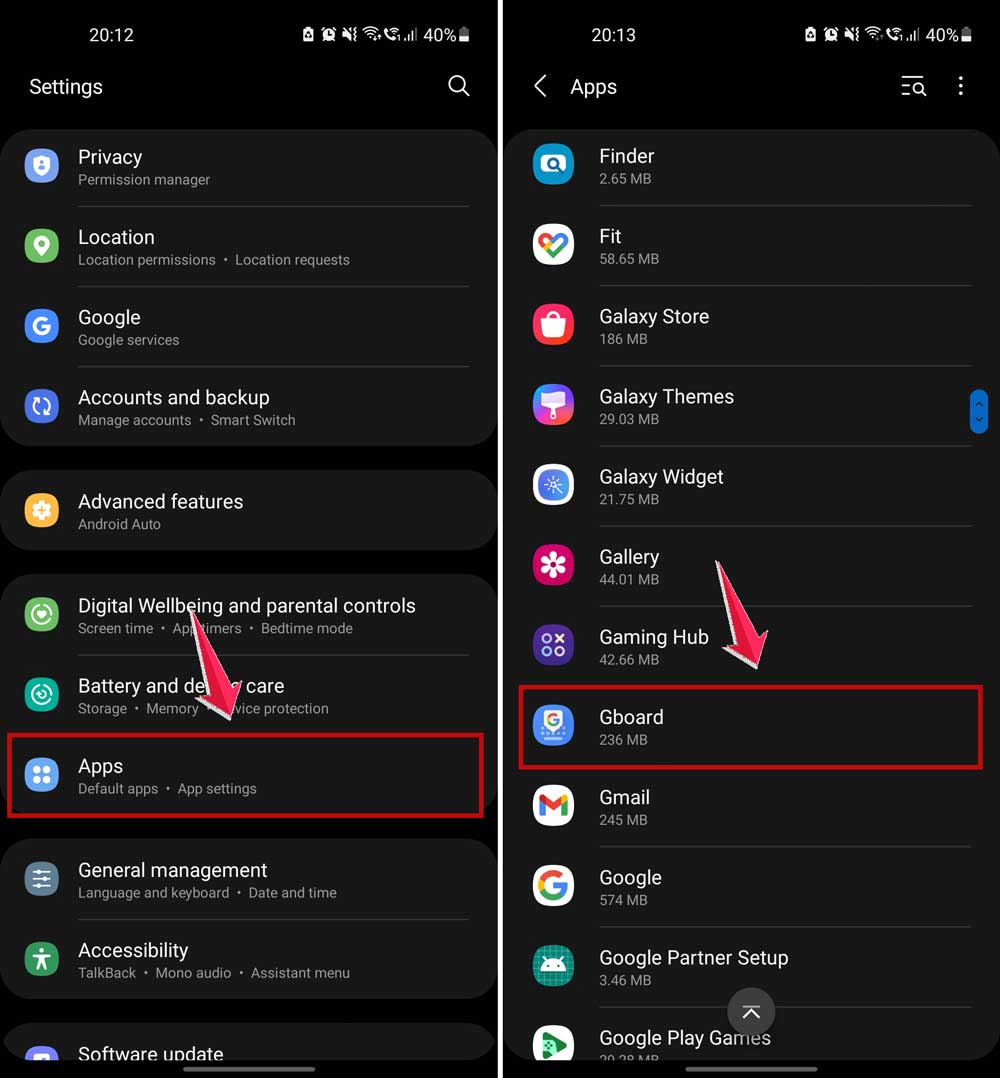
- Tap Storage.
- Tap Clear Cache and then Clear Data.
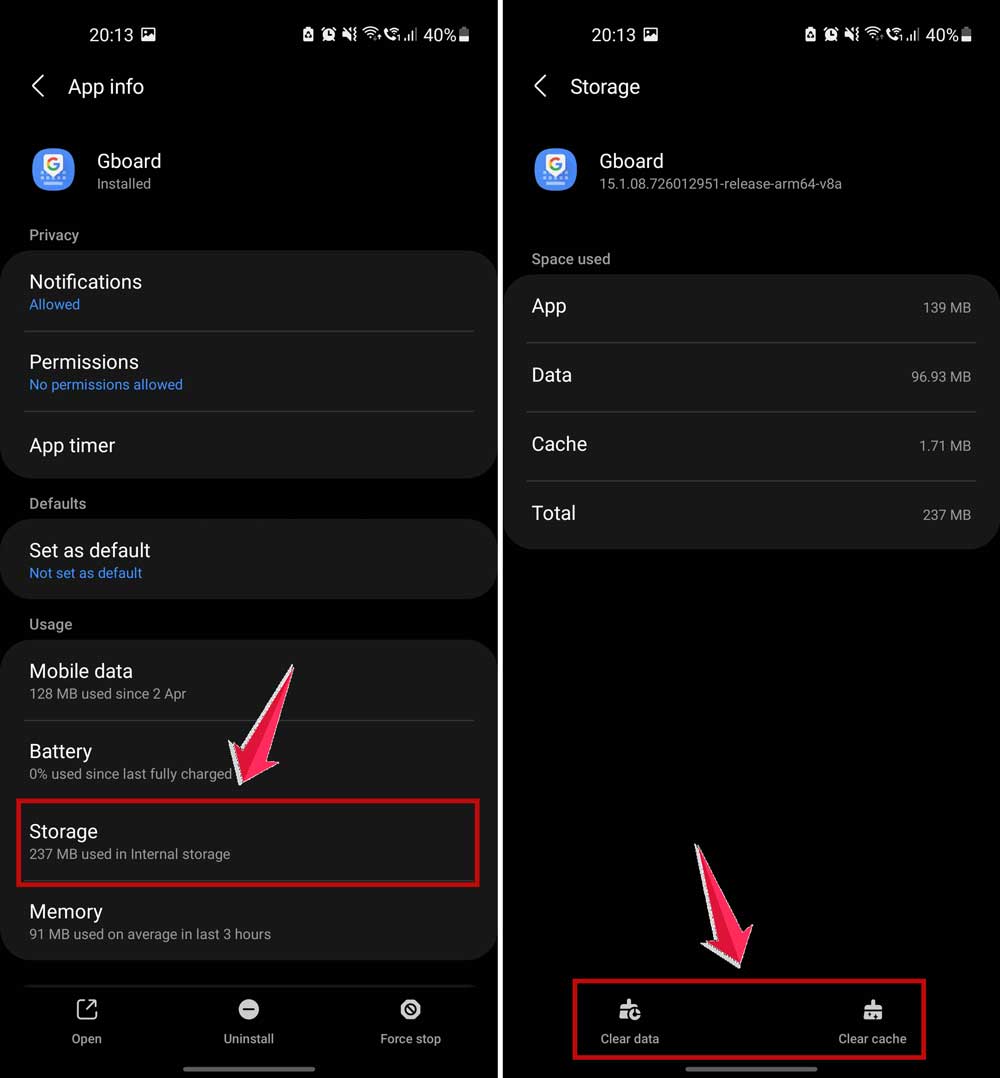
Clearing data may reset some of your keyboard preferences, like themes or saved words. But it’s worth it if it stops the crashes.
#3: Reboot your device
This one’s easy but powerful. Restarting your phone clears out temporary glitches and gives everything a fresh start.
Here’s what to do:
- Press and hold the Power button on your phone.
- Tap Restart or Power off.
- Wait a few seconds, then turn your phone back on.

Now, open your messages and try using emojis again. Sometimes, that’s all it takes.
#4: Try a different keyboard
If your current keyboard keeps crashing, it might just be time for a change. There are plenty of great keyboard apps out there.
Here’s how to try a new one:
- Open your app store.
- Search for a new keyboard app (like Gboard, SwiftKey, or Grammarly Keyboard).
- Download and install it.
- Follow the setup instructions to enable the new keyboard.
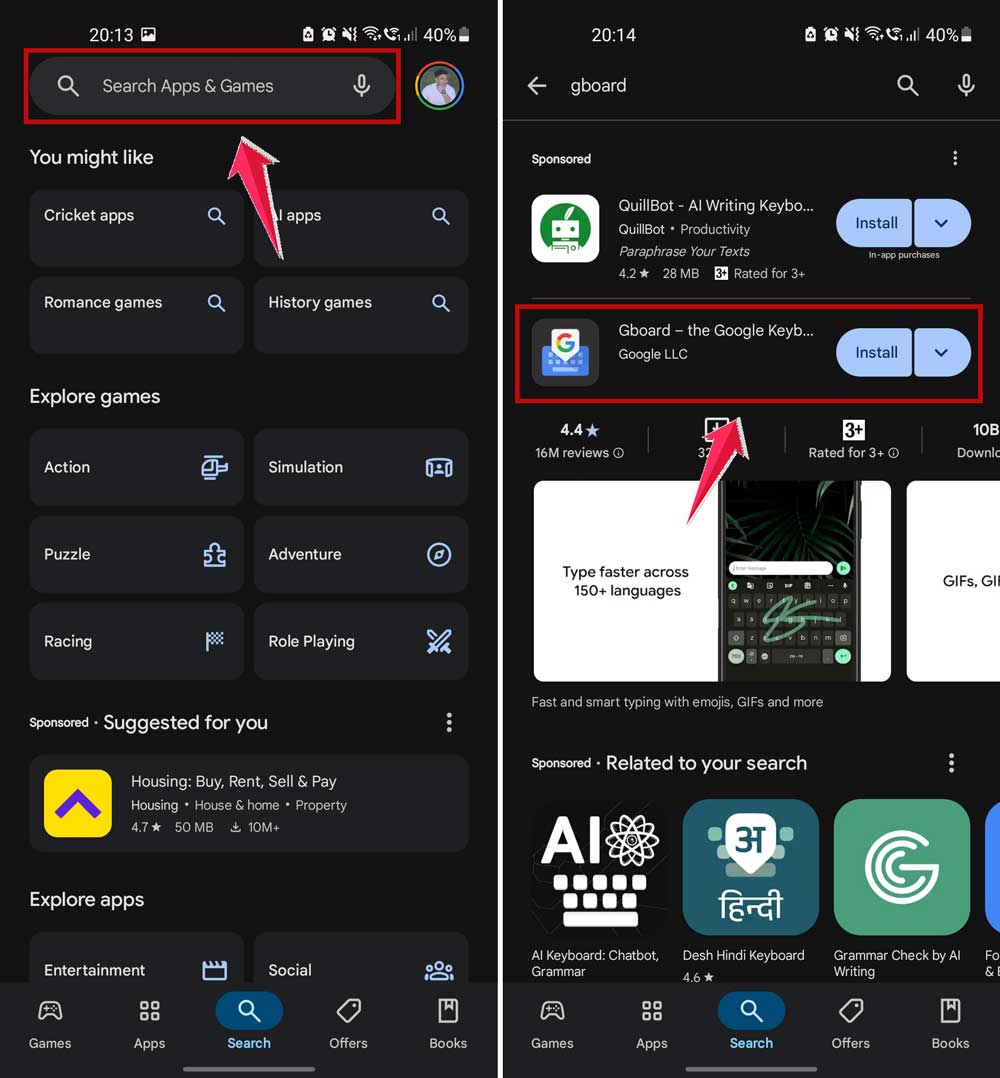
Then test it out. Try sending a few emojis. If it works fine, your old keyboard was probably the issue.
#5: Check for system updates
Your phone’s system updates aren’t just for looks—they often include bug fixes that can help with problems like this.
Here’s how to check for updates:
- Go to your phone’s Settings.
- Tap Software Update or System Updates.
- If an update is available, tap Download and Install.

Once your phone is updated, reboot it and try using your keyboard again.
Extra tips to keep your keyboard from crashing
Still having trouble? Don’t worry. I’ve got a few more tips that might help you out.
1. Cut down on emoji use
I get it—emojis are fun. But if your keyboard crashes every time you use a bunch of them, try dialing it back. Use fewer emojis for a while and see if your keyboard behaves better.
2. Check keyboard settings for reset options
Some keyboard apps have a reset option in their settings. This can restore the keyboard to its default state and fix weird bugs.
- Open your keyboard app or go to keyboard settings.
- Look for a Reset or Restore Defaults option.
- Tap it and confirm.
3. Contact tech support
If nothing’s working, it might be time to reach out. Most keyboard apps have a support team you can contact. They may already know about the issue and have a fix.
4. Use text instead
As a temporary solution, try avoiding emojis altogether. Just type out your message in plain text. It’s not as fun, but it will keep your keyboard from crashing until you fix the problem.
5. Explore different settings
Sometimes, turning off certain features in your keyboard app (like emoji suggestions or stickers) can help. Go into the settings and see what you can disable to lighten the load.
The takeaway
Your keyboard crashing when you use emojis is frustrating—I totally get that. But now, you’ve got a bunch of fixes to try. Start by updating your keyboard app and clearing the cache.
If that doesn’t work, move on to restarting your phone, trying a different keyboard, or checking for system updates.
Keep in mind, sometimes it’s just a temporary glitch. Other times, it’s a sign that your keyboard or phone needs a little tune-up.
Either way, you’ve got this. Follow the steps we talked about, and you’ll be back to sending your favorite emojis in no time.
Still stuck or have a question? Drop a comment below and let me know how it’s going. I’m here to help!



Hey Sumit,
thanks for this detailed article.
However, I couldn’t find info on how to clean up corrupted Emoji Data.
Any hints?
Thanks, Jens 🙂