Oh no! Your Snapchat score isn’t moving, huh? That’s gotta be frustrating—especially if you’ve been sending a bunch of Snaps and nothing’s changing.
Your Snapchat Score is like a little badge that shows how active you are on the app. It keeps track of how much you send and receive Snaps, and it feels good seeing that number go up.
But when it doesn’t move? Yeah, it can feel like something’s broken. You’re putting in the effort, but Snapchat’s not giving you credit. That’s not cool, and I get why you’re here.
Don’t worry, though. You’re not alone, and this is something we can fix together.
In this guide, I’ll walk you through the most common reasons your Snapchat score might be stuck—and more importantly, what you can do to get it moving again. Most of the time, the fix is simple, and you’ll be back to snapping in no time.
Why isn’t your Snapchat score going up?
Let’s figure this out. There are a few common reasons why your score might not be updating.
Some are super simple, and others might need a little more effort.
1. It could be your internet connection
If your internet is slow or not working properly, Snapchat might not be able to update your score. This happens more often than you’d think.
Try switching between Wi-Fi and mobile data to see if something changes. A weak or unstable connection can stop updates from showing up correctly.
2. The app might be glitching
Apps aren’t perfect. Sometimes Snapchat just has a bad day. If you haven’t updated the app in a while, it might be running into bugs.
New updates usually come with fixes for these kinds of issues, so keeping your app up to date really helps.
3. Your account might be having issues
This one’s rare, but sometimes an account can get flagged or temporarily restricted. If Snapchat thinks something’s off, it might pause your score updates.
Don’t panic—this usually fixes itself or can be sorted out with a quick support request.
4. Snapchat’s servers could be down
Sometimes the problem isn’t you at all. If Snapchat’s servers are down or under maintenance, your score won’t update until they’re back up.
You can check this using websites like Downdetector or by asking a friend if they’re seeing issues too.
Alright, if any of those sound like what you’re dealing with, let’s move on to the fun part—fixing it.
How to Fix Snapchat Score Not Updating
Now that we’ve talked about what might be causing the problem, it’s time to fix it. I’ll guide you through some easy steps.
You don’t need to be a tech expert—just follow along and we’ll get your score back on track.
#1. Make sure you’re connected to the internet
Let’s start simple. If you’re not connected properly, your score won’t update. Try these steps to make sure everything’s working:
- Switch between Wi-Fi and mobile data.
- Turn airplane mode on and off to reset your connection.
- Restart your router if you’re using Wi-Fi and it seems slow.
Once your internet is stable, open Snapchat again and check your score. It might just need a moment to update.
#2. Restart the Snapchat app
Sometimes, all your app needs is a quick refresh. If it’s stuck, this could do the trick.
- Close Snapchat completely (swipe it away from your recent apps).
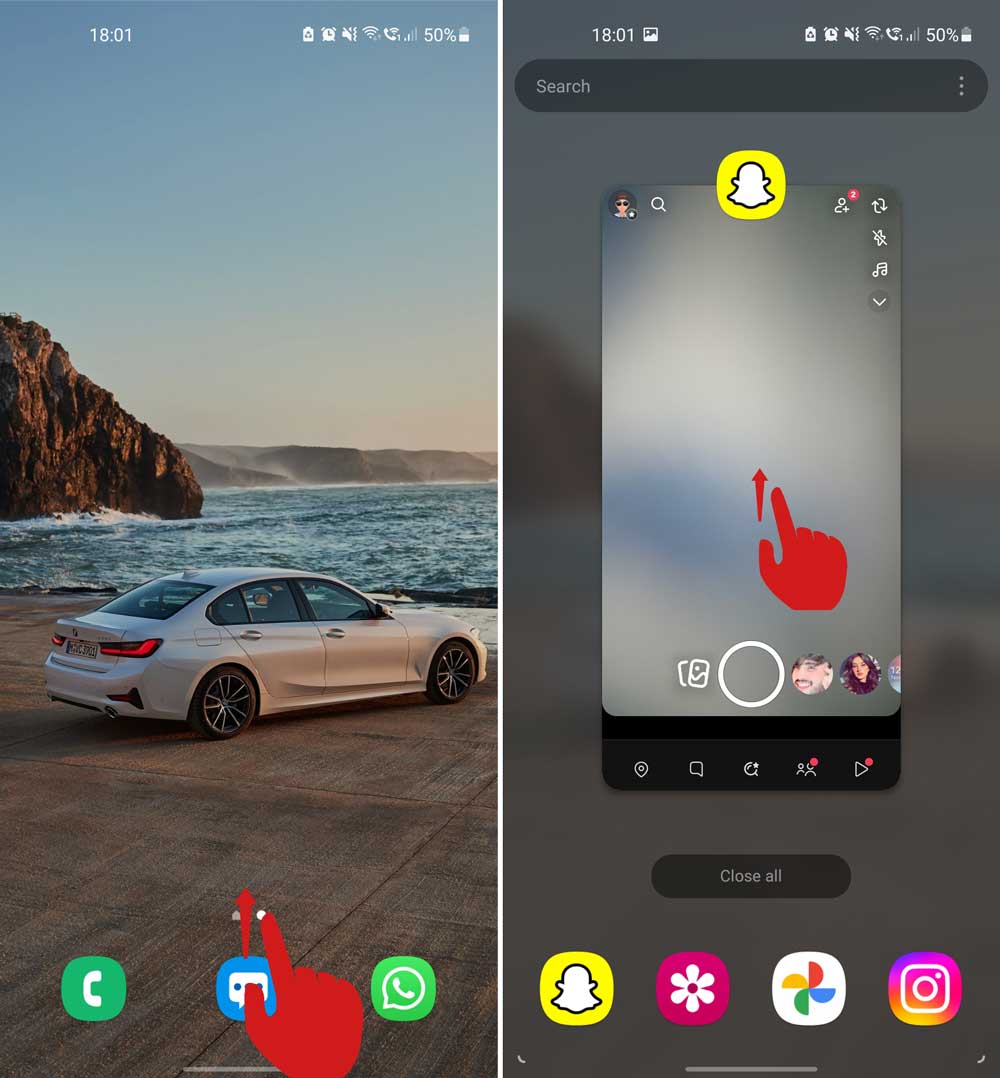
- Open Snapchat again from your home screen.
Give it a few seconds and check your score again. This works more often than you’d expect.
#3. Check for updates
If your app isn’t updated, it might be running into issues that have already been fixed in newer versions.
- Go to the App Store (iPhone) or Google Play Store (Android).
- Search for Snapchat.
- If you see an Update button, tap it.
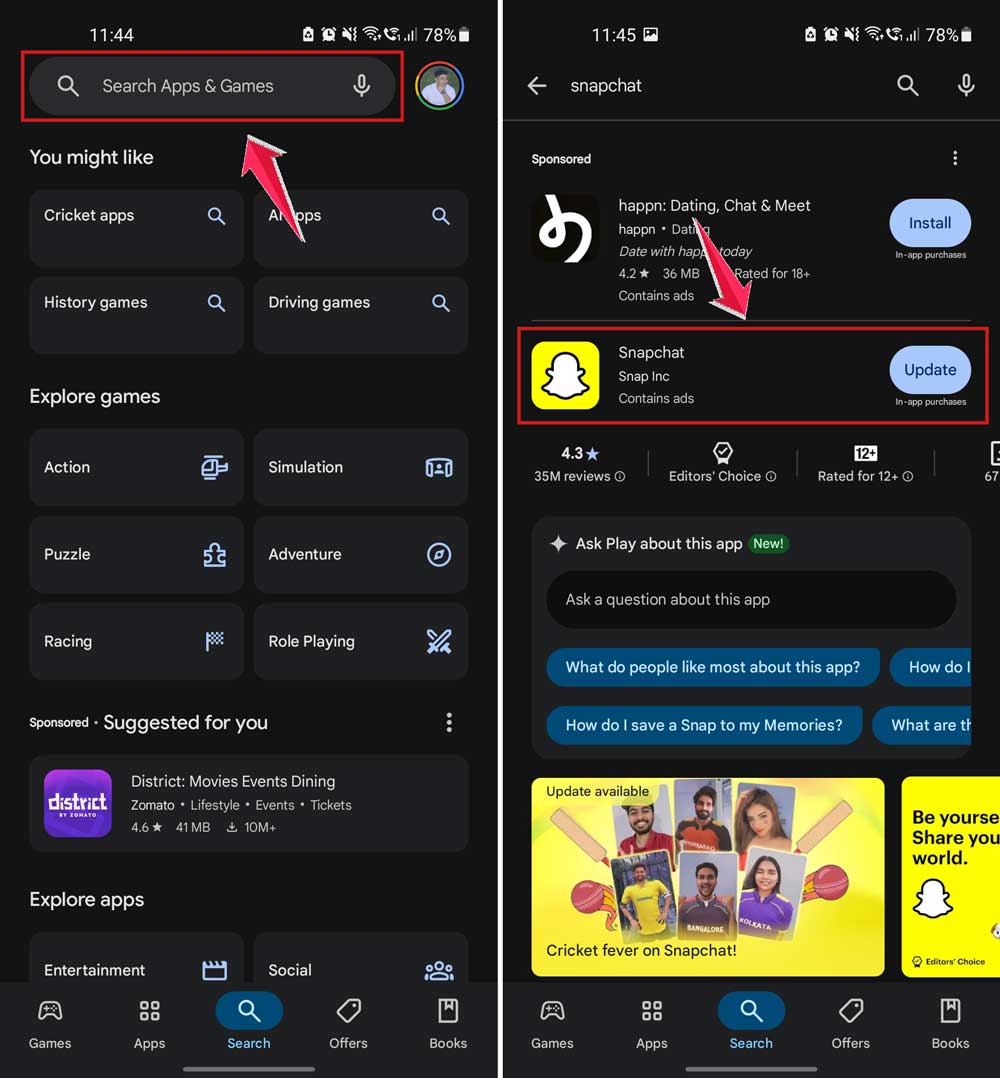
After updating, open the app again and see if your score moves. Updates often fix little bugs that cause score delays.
#4. Log out and log back in
This one’s simple but effective. Logging out and back in can refresh your account data and fix syncing issues.
- Open Snapchat and tap your profile icon.
- Tap the gear icon (Settings).

- Scroll down and tap Log Out.
- Log back in with your username and password.
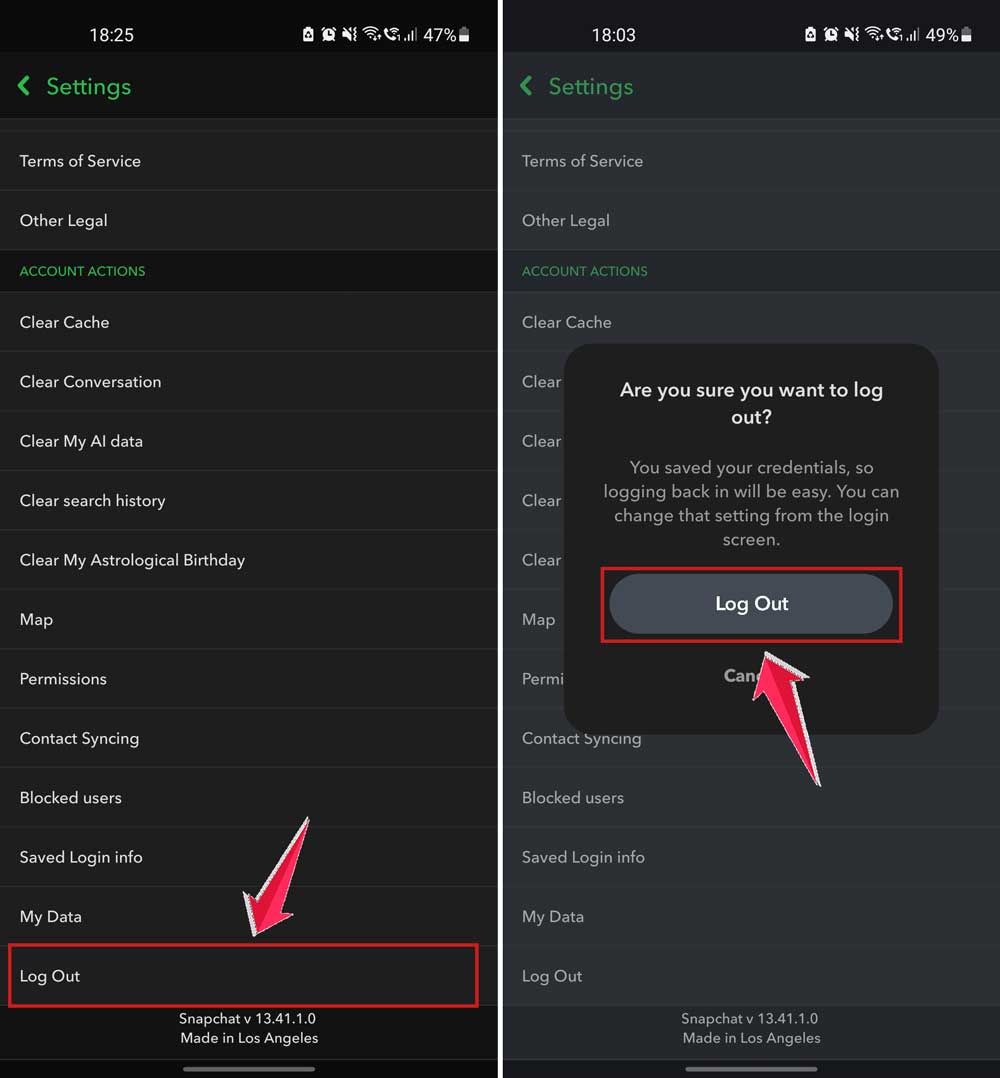
This resets your session and might be enough to kick your score back into action.
#5. Reach out to Snapchat Support
Tried everything and still stuck? Time to get a little help from the Snapchat team. They’re the only ones who can check if something’s wrong with your account.
- Go to the Snapchat Support page (just search “Snapchat Support” in Google).
- Scroll to the bottom and tap Contact Us.
- Follow the prompts and explain your issue clearly.

They usually respond quickly, and if there’s a problem on their end, they’ll help you sort it out.
More Tips to Get Your Score Moving
Still no luck? Don’t worry, I’ve got a few extra tricks you can try. These might help give your score the push it needs.
1. Keep sending Snaps
Sometimes, your score just needs a little activity. Keep snapping your friends, open Snaps you receive, and stay active on the app. The more you use it, the more chances your score will update.
2. Clear the Snapchat cache
Too much cached data can slow things down. Clear it out to make Snapchat run smoother:
- Go to Settings in Snapchat.
- Tap Clear Cache under “Account Actions.”
- Confirm when prompted.

This won’t delete any of your Snaps or chats, just the extra files taking up space.
3. Chat and snap with friends
Engaging with friends helps keep your account active. Try starting new streaks or keeping up with old ones. Sometimes the score updates after a few interactions.
4. Free up storage space
If your phone is full, apps can act weird. Try deleting a few old apps or files to give Snapchat some breathing room. A little space can make a big difference.
5. Be patient
If you’ve tried everything, sometimes all you can do is wait. Snapchat might be handling something in the background. Give it a little time and check again later.
The Takeaway
So, your Snapchat score isn’t updating, and it’s been driving you a little crazy.
We’ve talked through a bunch of fixes—checking your internet, restarting the app, updating it, and even contacting support if needed. Most of these are quick and easy, and they usually do the trick.
Just remember: even if your score isn’t going up right away, your Snaps are still being sent.
Your streaks, messages, and stories are all still working. The score is just a number, and it’ll catch up.
Now it’s your turn. Try the steps, stay active, and keep enjoying Snapchat. Your score will be back on track soon.
And hey, if you’ve got a question or want to share what worked for you, drop a comment below!