You sent a message on Instagram, and now you regret it.
Maybe it was a typo. Maybe it went to the wrong person. Or maybe you just changed your mind. Whatever buddy. But you deleted it.
But now you’re thinking. Will they know? Does Instagram tell them I deleted something?
Let’s clear this up right now. Because Instagram gives you two options to delete messages. And both behave differently.
And yes, one of them can still leave your message sitting in the other person’s inbox.
So if you’re trying to clean things up quietly, it’s important to know what you’re doing.
Let’s break it down.
First, understand this: “Delete for You” vs. “Unsend” on Instagram.
I really want to make this clear in the very first place.
Instagram has two ways to remove a message. And they are not the same.
If you tap and hold a message, you’ll see two options:
- Delete for You.
- Unsend.
“DELETE FOR YOU” is the option when you send a message and you just want to delete it for yourself only.
It won’t be shown in your message, but it is still sent to the other person, and the message is still in their inbox, but not available in your inbox. Because you have already deleted it from your end.
And then comes the “UNSEND” feature. This is the feature that deletes the message from both ends, and the other person won’t be able to see if you sent it or not.
And no, Instagram doesn’t send them any notification that you unsent something. The message vanishes quietly.
So remember. If you just want to clear your own chat view, use “Delete for You.” But if you want the message gone from their inbox too, you need to “Unsend” it.
Does Instagram notify when you unsend a message?
No. Instagram does not notify anyone when you unsend a message.
You could send a message. Regret it instantly. Hit “Unsend.” And it’ll be like you never sent anything at all.
There won’t be any message like “This message has been removed” or “This user deleted something.” Not anymore.
In the past, Instagram used to show a small sign saying “This message was unsent.” But not now. In 2025, it simply disappears.
So if the other person wasn’t looking at their screen at the moment you sent it, they won’t even know anything was removed.
It gives you a bit of breathing room.
But wait.
What if they already saw your message?
Well, that’s the catch.
If they opened the chat and saw the message, even for a second, then it’s in their head. Unsending won’t erase that from their memory.
Instagram can remove it from the screen. But not from their mind.
Worse, if they took a screenshot or if their notification showed part of your message. It’s already out there.
So yes, you can unsend a message. But if they saw it before you did, it’s a little too late.
Think fast if you need to undo something. The quicker you act, the better your chances that they didn’t see it yet.
Can someone recover your unsent message?
Not really. Instagram doesn’t give users a way to bring back unsent messages.
If you unsend something, the message is gone from the app.
But let’s talk real-world possibilities.
If their internet was on when you sent it, they might have seen it in their phone’s notification bar. Even if you deleted it later.
And if they were using a third-party app or screen recording tools, there’s always a chance they captured it.
There are even apps that claim to log notifications or record messages before they’re deleted.
That’s why it’s smart to never send something you might regret. Even if you think you can delete it later.
How unsend works in group chats
Now, let’s say you’re in a group chat and you send something you want to take back.
Same rules apply.
If you tap and “Unsend” that message, it’ll disappear from the group for everyone. Nobody gets notified. It just vanishes.
But remember. The more people in the chat, the more eyes that might have already seen it.
And once even one person sees it, unsending it doesn’t change that.
So be extra careful when sending messages in groups. It’s harder to control who sees what and when.
Does Instagram keep a record of unsent messages?
Yes. Even though your message disappears from both chat windows, Instagram still keeps it behind the scenes for a while.
If someone reports a chat for abuse, harassment, or anything else, Instagram may access your messages, even the ones you unsent.
They’re stored for a short period for moderation or investigation purposes.
So no, you can’t just send anything you want, delete it, and think it’s completely gone forever. Not from Instagram’s servers.
Can you unsend any type of message?
Yes. You can unsend any kind of message on Instagram. Text, photos, videos, voice messages, stickers. You name it.
The process is the same for all:
- Open the conversation.
- Tap and hold the message.
- Select “Unsend.”
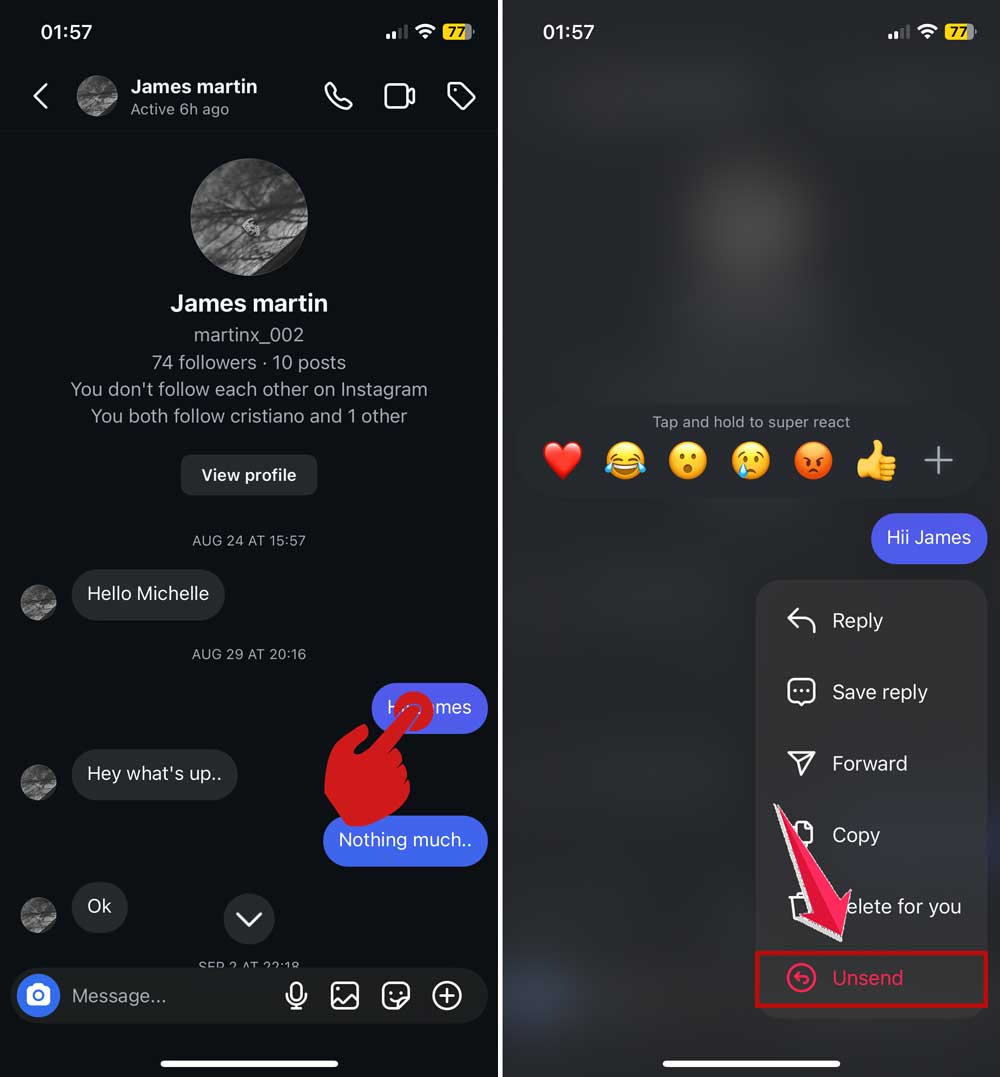
And that’s it. It’s gone for both you and the other person.
Even if it was a video or a photo, it gets removed completely from the chat.
Is there a time limit to unsend a message?
No. Instagram doesn’t put a timer on how long you can wait before unsending something.
You could unsend a message one second after sending it. Or after one week. Or after a year.
There’s no expiry date.
But again, the longer you wait, the higher the chance the other person has already seen it.
So if you change your mind, do it fast.
What about Vanish Mode?
If you’re worried about message privacy, Instagram also has something called Vanish Mode.
When you use Vanish Mode, any messages you send will disappear automatically once the other person sees them and leaves the chat.
No need to manually unsend.
To use it:
- Open any chat.
- Swipe up from the bottom of the screen until it says “Hold to enable Vanish Mode.”
- Release and start chatting.
It’s like having self-destructing messages. Great if you want something to be seen once and never saved.
But even in Vanish Mode, screenshots are still a risk. Instagram may notify you if a screenshot is taken, but it’s not foolproof.
So… what’s the safest move?
If you ever send something and instantly regret it. Yes, “Unsend” is a lifesaver.
It gives you a chance to take back control.
But remember, it only works if:
- They haven’t seen it yet.
- They didn’t take a screenshot.
- Their notifications didn’t capture it.
And no, they won’t be notified about your unsend.
So if you act fast, it’s like it never happened.
But if they saw it already… well, then you’ll have to deal with it the old-fashioned way. Maybe with a follow-up message. Or maybe just letting it go.
The takeaway
Instagram doesn’t notify anyone when you unsend a message.
But that doesn’t mean you can be reckless.
If you want full control, think before you hit “Send.”
Know the difference between “Delete for You” and “Unsend.” One just hides it from your screen. The other removes it completely.
And if you’re not sure whether to say something. Maybe wait. Or rethink. It’s always easier to avoid the mistake than to fix it later.
Stay smart. Stay safe. And now you know exactly how Instagram handles deleted messages.