Have you ever found yourself blocked on WhatsApp and wondered how to fix it? Maybe you had a misunderstanding with a friend or family member, and now you can’t reach them through the app. It’s a frustrating situation, but don’t worry – you’re not alone.
Many people face this issue and aren’t sure what to do next. That’s why I’ve put together this guide to help you understand your options when you’ve been blocked on WhatsApp.
In this article, you’ll learn about some methods that might help you reconnect with someone who has blocked you.
How to Tell if Someone Blocked You on WhatsApp?
Wondering if someone has blocked you on WhatsApp? Here are some signs to look out for:
- You might not be able to see the person’s profile picture anymore: Instead, you’ll see the default WhatsApp avatar.
- If you can’t see when the person was last online, it could be a sign of being blocked: Keep in mind, though, that some people choose to hide this information in their privacy settings.
- When you send a message, you’ll only see one tick (✓) instead of two (✓✓): This means your message wasn’t delivered.
- You won’t be able to group chat: If you try to add the person to a WhatsApp group and get an error message, it might indicate you’ve been blocked.
- When you try to call the person, the call won’t go through: It will show as “Calling” but never actually ring.
If all these clues don’t add up, congrats! Your friend hasn’t blocked you. But if they do…well, it looks like you’ve been blocked. But, no stress! Stick with me, and I’ll show you how to unblock yourself on WhatsApp. Stay tuned!
5+ Best Ways to Unblock Yourself on WhatsApp
So, you’re feeling a bit down because someone blocked you on WhatsApp? It’s okay, it happens. And guess what? You’re not the only one.
But hey, I’ve got some tricks up my sleeve to help you out! Ready? Let’s jump right in!
Method 1: Reset Your WhatsApp Account
This method works for both Android and iPhone users, but keep in mind that you’ll lose your chat history and group memberships. If you’re okay with that, here’s what you can do:
- Open WhatsApp on your phone.
- Go to the Settings menu.
- Select “Chats”
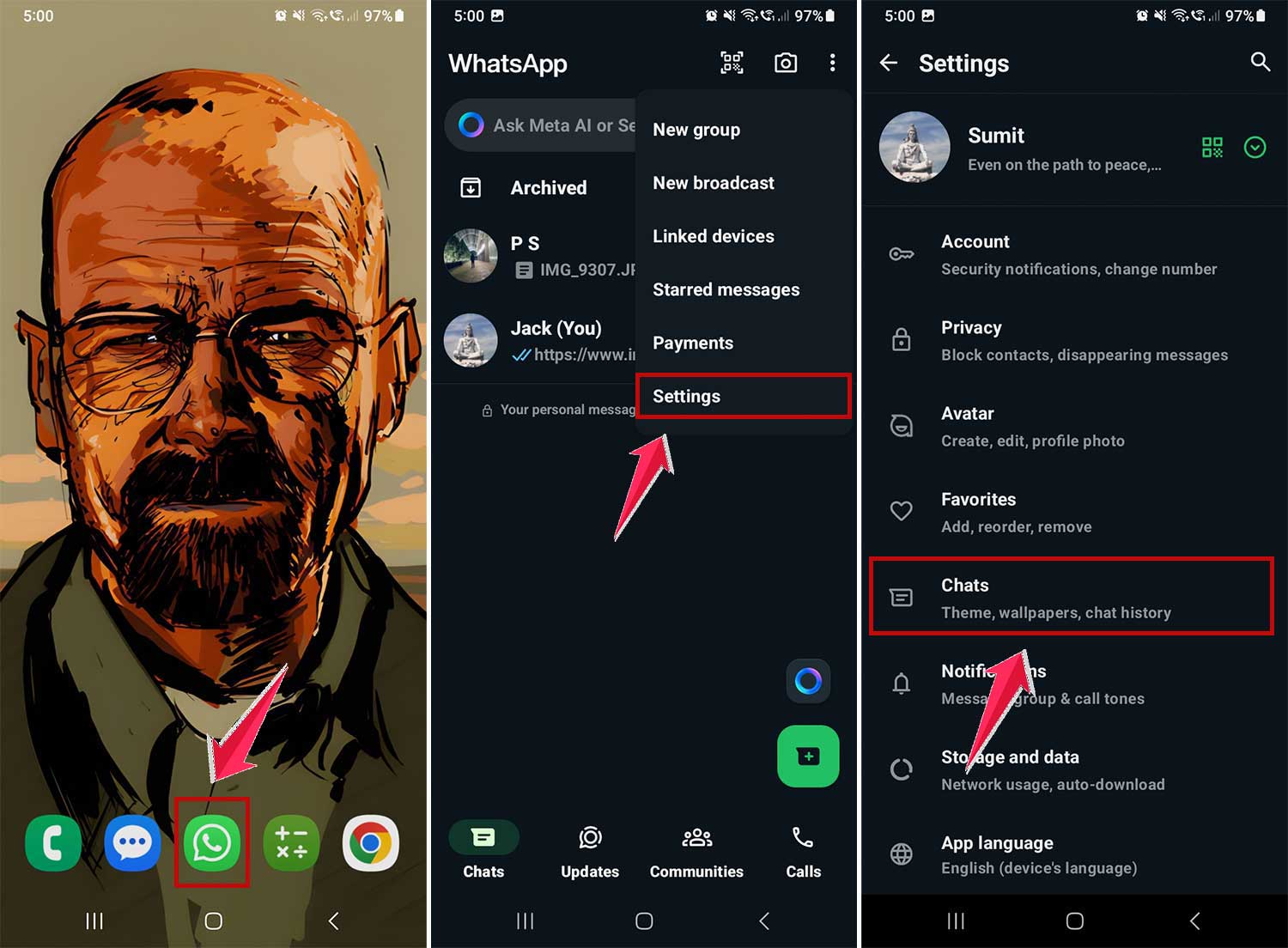
- Now click on Chat backup
- Then “Backup” to save your messages to Google Drive.
- Return to Settings, then go to “Account.”
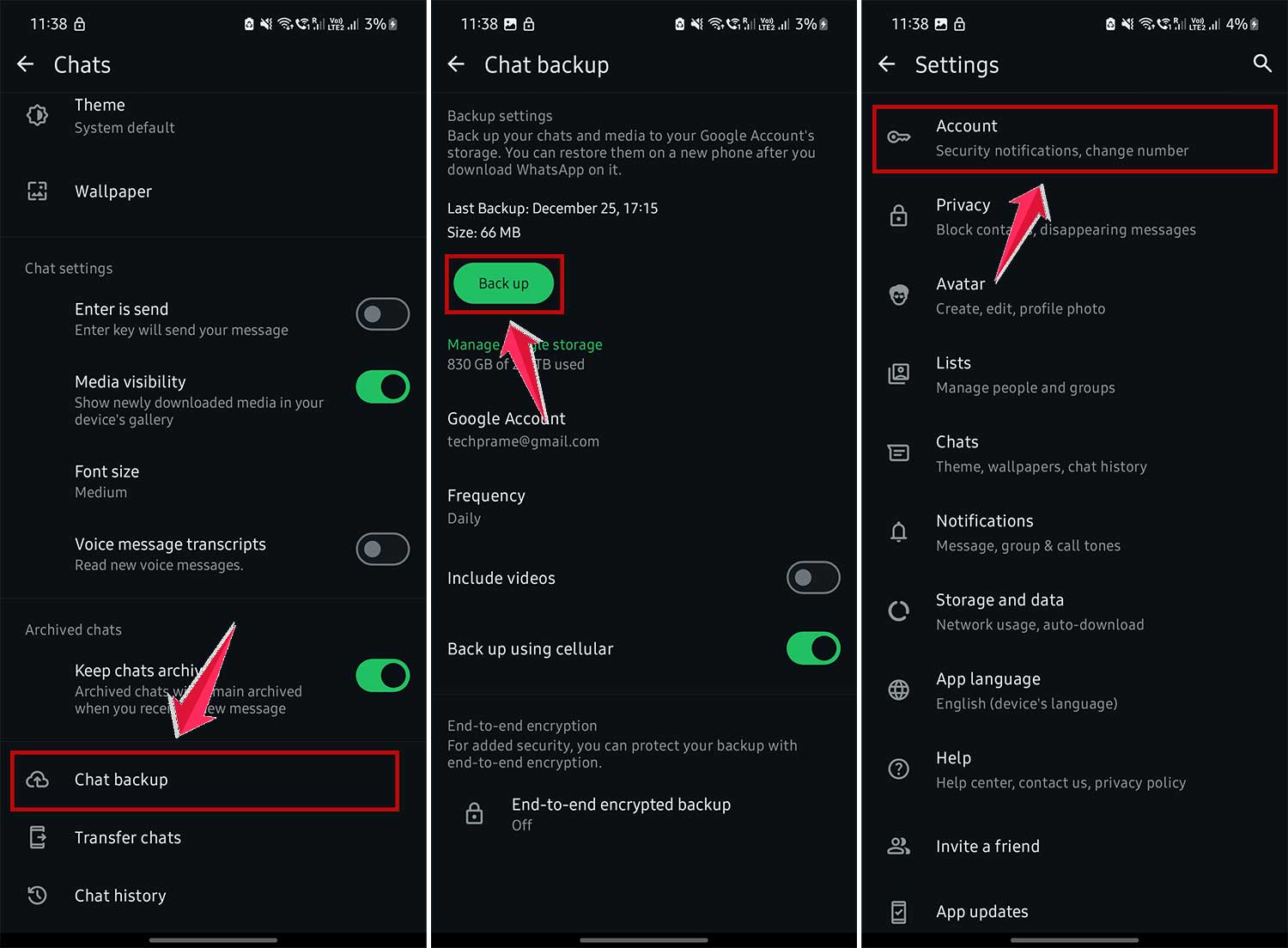
- Choose “Delete account.”
- Enter your mobile number and confirm.
- Select a reason for leaving when prompted.

- Uninstall WhatsApp from your phone and restart it.
- Reinstall WhatsApp and log in with your number.
After doing this, you should be able to message the person who blocked you. However, remember that this method erases your chat history and removes you from all groups. Also, consider whether the person might have had a reason for blocking you before attempting to contact them again.
Method 2: Use a Second Phone Number To Replace the First Number
If you’d prefer not to delete your account, here’s another approach you can try:
- You’ll need access to two different phone numbers for this method.
- Using the second phone number, create a new WhatsApp group.
- Add both your blocked number and the contact who blocked you to this group.
- Using the second phone number, exit the group.
- Now, your blocked number and the person who blocked you are in a group together. You can try sending a message.
Here’s an example:
Let’s say your main number is blocked. Use another phone number to create a group with your main number and the person who blocked you. Then, have the second number leave the group. This leaves just you and the other person in the group.
Method 3: Using Dual Space on iPhone
For iPhone users, there’s a specific method using an app called Dual Space:
- Get the ‘Dual Space’ app from the App Store.
- After installing Dual Space, sign up and use it to create a clone of WhatsApp.
- Open the cloned WhatsApp and sign in with a different phone number.
- From this new number, you can try sending a message to the contact who blocked you.

Method 4: Using Parallel Space on Android
Android users, here’s a method for you using an app called ‘Parallel Space’:
- Get the app from the Google Play Store.
- Open Parallel Space, register, and create a clone of WhatsApp.
- Sign into the cloned WhatsApp with a different phone number.
- Try sending a message to the person who blocked you from this new number.

Method 5: Unblocker for WhatsApp App
There’s an app specifically designed for unblocking on WhatsApp:
- Get ‘Unblocker for WhatsApp’ from the Google Play Store.
- Open it after installation.
- Press the ‘Start Unblocking’ button.
- Make sure to understand the terms before proceeding.
- Input your mobile number and submit.
- The app claims to unblock you within 24 hours.
Method 6: The Direct Approach
Sometimes, the best solution is the most straightforward:
- Try to have a real conversation to clear up any misunderstandings.
- If direct contact doesn’t work, a friend might help mediate.
- Sometimes, people need time to think. Respect their need for space.
- If you made a mistake, own up to it. A sincere apology can go a long way.
- If nothing works, consider whether it’s time to move on.
Wrapping Up
You’ve now learned several methods to potentially reconnect on WhatsApp after being blocked. While these techniques might help, use them responsibly and considerately.
Before attempting to bypass a block, reflect on why it happened. Is reaching out the best action? If you decide to try, approach it with empathy and respect. Be ready to listen and understand their perspective.
Remember, healthy relationships are built on mutual respect and open communication. If someone consistently blocks you, it might be time to reevaluate the relationship.
Use these methods wisely, and always prioritize clear, honest communication. What are your thoughts on this topic? Share your experiences in the comments.